Spring Boot系列十九 Spring boot集成 swagger
Swagger 是一款RESTFUL接口的文档在线自动生成+功能测试功能软件 Swagger 是一个规范和完整的框架,用于生成、描述、调用和可视化 RESTful 风格的 Web 服务。总体目标是使客户端和文件系统作为服务器以同样的速度来更新。文件的方法,参数和模型紧密集成到服务器端的代码,允许API来始终保持同步
Spring Boot集成Swagger
本文涉及的工程: swagger
pom.xmlswagger需要引入如下的jar
<!--  引入swagger包 -->
<dependency>
    <groupId>io.springfox</groupId>
    <artifactId>springfox-swagger2</artifactId>
    <version>2.2.2</version>
</dependency>
<dependency>
    <groupId>io.springfox</groupId>
    <artifactId>springfox-swagger-ui</artifactId>
    <version>2.2.2</version>
</dependency>
@EnableSwagger2使用@EnableSwagger2注解在Control类上就可以swagger的功能
@RestController
@EnableSwagger2 // 启动swagger注解
// api-value:定义名称,如果没有定义,则默认显示类名
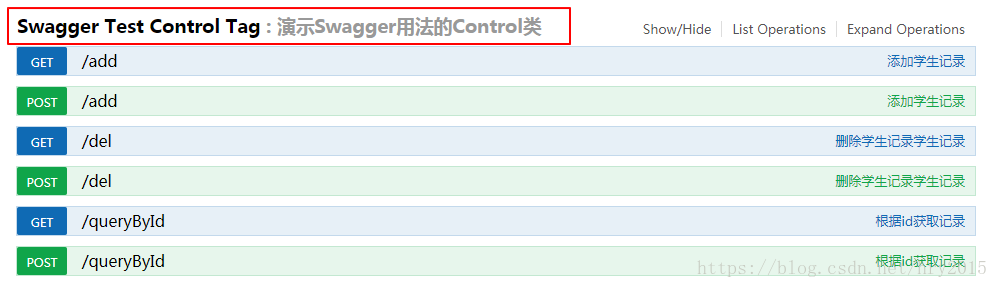
@Api(value = "Swagger Test Control", description = "演示Swagger用法的Control类", tags = "Swagger Test Control Tag")
public class SwaggerTestCtl {
..
}
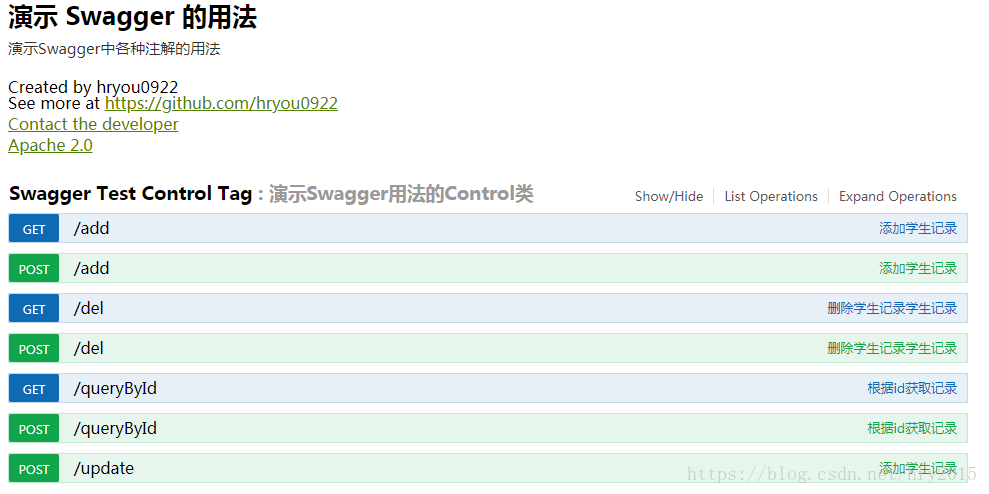
执行启动类执行启动类,访问如下连接 http://127.0.0.1:8080/swagger-ui.html#/ 就可以进入swagger页面,进行接口测试,界面如下:
ApiInfo类
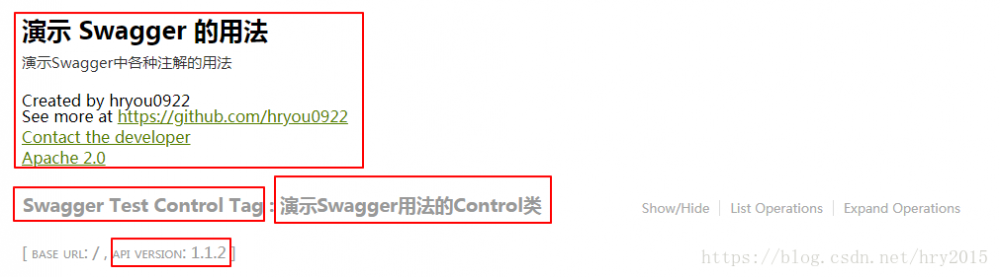
我们创建ApiInfo实例,我们为swagger配置更多的接口说明
@Bean
public Docket api() {
	return new Docket(DocumentationType.SWAGGER_2)
		.apiInfo(getApiInfo())
		// .pathMapping("/")// base,最终调用接口后会和paths拼接在一起
		.select()
		// .paths(Predicates.or(PathSelectors.regex("/api/.*")))//过滤的接口
		.apis(RequestHandlerSelectors.basePackage("com.hry.swagger.ctl")) //过滤的接口
		.paths(PathSelectors.any())
		.build();
}

private ApiInfo getApiInfo() {
	// 定义联系人信息
	Contact contact = new Contact("hryou0922","https://github.com/hryou0922", "hryou0922@126.com");
	return new ApiInfoBuilder()
		.title("演示 Swagger 的用法") // 标题
		.description("演示Swagger中各种注解的用法") // 描述信息
		.version("1.1.2") // //版本
		.license("Apache 2.0")
		.licenseUrl("http://www.apache.org/licenses/LICENSE-2.0")
		.contact(contact)
		.build();
}
重启服务,界面如下:
swagger的注解
swagger的注解概述
我们可以使用swagger定义更详细接口说明
@Api:用在类上,标志此类是Swagger资源
	value:接口说明
	tags:接口说明,可以在页面中显示。可以配置多个,当配置多个的时候,在页面中会显示多个接口的信息

@ApiOperation:用在方法上,描述方法的作用

@ApiImplicitParams:包装器:包含多个ApiImplicitParam对象列表

@ApiImplicitParam:定义在@ApiImplicitParams注解中,定义单个参数详细信息
		○ paramType:参数放在哪个地方
			§ header-->请求参数的获取:@RequestHeader
			§ query-->请求参数的获取:@RequestParam
			§ path(用于restful接口)-->请求参数的获取:@PathVariable
			§ body(以流的形式提交 仅支持POST)
			§ form(以form表单的形式提交 仅支持POST)
		○ name:参数名
		○ dataType:参数的数据类型 只作为标志说明,并没有实际验证
			§ Long
			§ String
		○ required:参数是否必须传
			§ true
			§ false
		○ value:参数的意义
		○ defaultValue:参数的默认值

@ApiModel:描述一个Swagger Model的额外信息
	@ApiModel用在类上,表示对类进行说明,用于实体类中的参数接收说明

@ApiModelProperty:在model类的属性添加属性说明

@ApiParam:用于Controller中方法的参数说明

@ApiResponses:包装器:包含多个ApiResponse对象列表

@ApiResponse:定义在@ApiResponses注解中,一般用于描述一个错误的响应信息
		○ code:错误码,例如400
		○ message:信息,例如"请求参数没填好"
		○ response:抛出异常的类

@Authorization	Declares an authorization scheme to be used on a resource or an operation.

@AuthorizationScope	Describes an OAuth2 authorization scope.
##演示使用注解demo 本节我们演示上节的注解如何使用 ###@Api 用在类上,标志此类是Swagger资源,对接口更加详细说明
@RestController
@EnableSwagger2 // 启动swagger注解
@Api(value = "Swagger Test Control", description = "演示Swagger用法的Control类", tags = "Swagger Test Control Tag")
public class SwaggerTestCtl {

}
结果如下:
###@ApiOperation 用在方法上,描述方法的作用
// 方法的说明
@ApiOperation(value = "根据id获取记录", response = Student.class)
// 定义请求参数
@ApiImplicitParams({ @ApiImplicitParam(paramType = "query", dataType = "String", name = "id", value = "主键", required = true) })
public Student queryById(String id){
    System.out.println("queryById id = " + id);
    return new Student();
}
结果如下:

@ApiImplicitParams 和 @ApiImplicitParam
// 定义请求参数
@ApiImplicitParams({ @ApiImplicitParam(paramType = "query", dataType = "String", name = "id", value = "主键", required = true) })
public Student queryById(String id){
   System.out.println("queryById id = " + id);
   return new Student();
}
结果如下:

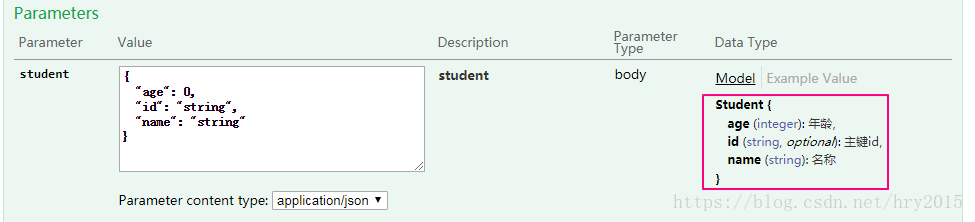
###@ApiModel 和@ApiModelProperty
定义model类
@ApiModel( description = "学生")
public class Student {
    @ApiModelProperty(value = "主键id")
    private String id;
    @ApiModelProperty(value = "名称", required = true)
    private String name;
    @ApiModelProperty(value = "年龄", required = true)
    private int age;
…
}
在方法使用
@RequestMapping(value = "/update", method = {RequestMethod.POST})
// 方法说明
@ApiOperation(value = "添加学生记录", notes="传递复杂对象DTO",produces = "application/json")
public int update(@RequestBody Student student){
    System.out.println("update student = " + student);
    return 1;
}
结果如下:
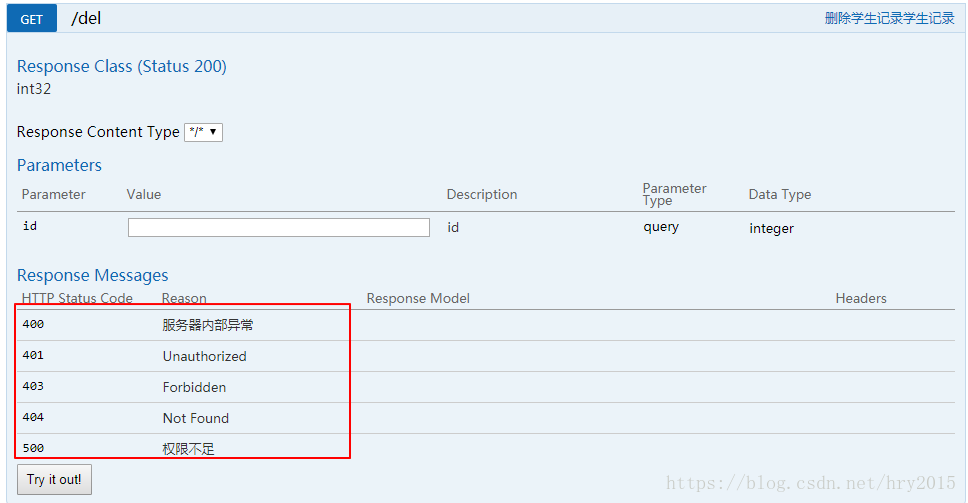
@ApiResponses和@ApiResponse
@RequestMapping(value = "/del", method = {RequestMethod.POST, RequestMethod.GET})
// 方法说明
@ApiOperation(value = "删除学生记录学生记录")
// 定义返回值意义
@ApiResponses({
        @ApiResponse(code = 400, message = "服务器内部异常"),
        @ApiResponse(code = 500, message = "权限不足") })
public int del(int id){
    System.out.println("del id = " + id);
    return 1;
}
结果如下:
正文到此结束
- 本文标签: Spring Boot UI Document 同步 服务器 ORM 学生 GitHub XML 删除 ip id 配置 HTML 参数 web bean description API json http 文件系统 map App REST apache Property js RESTful 实例 src pom IO 标题 CTO 软件 update Authorization https 模型 数据 Select build 测试 自动生成 cat 代码 value spring message git
- 版权声明: 本文为互联网转载文章,出处已在文章中说明(部分除外)。如果侵权,请联系本站长删除,谢谢。
- 本文海报: 生成海报一 生成海报二
热门推荐









相关文章



Loading...
![[HBLOG]公众号](https://www.liuhaihua.cn/img/qrcode_gzh.jpg)

