一个 SpringBoot 项目通过 SOFALookout & Prometheus 进行监控
SOFALookout ,是一个利用多维度的 metrics 对目标系统进行度量和监控的项目。SOFALookout 项目分为客户端部分与服务器端部分,由于 服务器端代码暂未开源,本文将讲解如何将 SOFALookout 的客户端采集到的 metrics 上报给 Prometheus 进行监控。
1.创建简单的 SpringBoot 的 demo 项目
- 创建 demo 工程
可以通过 http://start.spring.io/ 创建个 demo 项目(附加个 Web 模块便于演示)。 或者也可以本地快速构建项目,在 *nix系统创建项目结构 mkdir -p demo/src/main/java/hello :
demo
└── src
    └── main
        └── java
            └── hello
- 创建个 pom.xml 文件
<?xml version="1.0" encoding="UTF-8"?>
<project xmlns="http://maven.apache.org/POM/4.0.0" xmlns:xsi="http://www.w3.org/2001/XMLSchema-instance"
    xsi:schemaLocation="http://maven.apache.org/POM/4.0.0 http://maven.apache.org/xsd/maven-4.0.0.xsd">
    <modelVersion>4.0.0</modelVersion>

    <groupId>com.alipay.sofa</groupId>
    <artifactId>lookout-prom-integation-demo</artifactId>
    <version>0.1.0</version>

    <parent>
        <groupId>org.springframework.boot</groupId>
        <artifactId>spring-boot-starter-parent</artifactId>
        <version>2.0.2.RELEASE</version>
    </parent>

    <properties>
        <java.version>1.8</java.version>
    </properties>

    <dependencies>
        <dependency>
            <groupId>org.springframework.boot</groupId>
            <artifactId>spring-boot-starter</artifactId>
        </dependency>
        <dependency>
            <groupId>org.springframework.boot</groupId>
            <artifactId>spring-boot-starter-web</artifactId>
        </dependency>
    </dependencies>

    <build>
        <plugins>
            <plugin>
                <groupId>org.springframework.boot</groupId>
                <artifactId>spring-boot-maven-plugin</artifactId>
            </plugin>
        </plugins>
    </build>

    <repositories>
        <repository>
            <id>spring-releases</id>
            <name>Spring Releases</name>
            <url>https://repo.spring.io/libs-release</url>
        </repository>
    </repositories>
    <pluginRepositories>
        <pluginRepository>
            <id>spring-releases</id>
            <name>Spring Releases</name>
            <url>https://repo.spring.io/libs-release</url>
        </pluginRepository>
    </pluginRepositories>
</project>
- 创建个启动类
在 hello 的包下创建 Application.java 文件
package hello;

import org.springframework.boot.SpringApplication;
import org.springframework.boot.autoconfigure.SpringBootApplication;

@SpringBootApplication
public class Application {
        public static void main(String[] args) {
                SpringApplication.run(Application.class, args);
        }
}
2.配置生效 Prometheus 的 Exports
- 在 pom.xml 中添加依赖
增加 “lookout-sofa-boot-starter”,”lookout-reg-prometheus” 两个模块的依赖,版本用最新的(这里以 1.4.1 为例)
<dependency>
     <groupId>com.alipay.sofa.lookout</groupId>
     <artifactId>lookout-sofa-boot-starter</artifactId>
     <version>1.4.1</version>
</dependency>
<dependency>
     <groupId>com.alipay.sofa.lookout</groupId>
     <artifactId>lookout-reg-prometheus</artifactId>
     <version>1.4.1</version>
</dependency>
- 新增应用配置文件
首先创建个资源目录 mkdir -p demo/src/main/resources ,然后新建个 application.properties 文件(或 YAML 文件)。
echo "spring.application.name=demo" > demo/src/main/resources/application.properties
需要注意的是应用名是必须指定的!
- 检查启动状态
经过上面简单的配置,就可以运行 demo 了,并访问 http://localhost:9494 进行确认
➜  demo curl http://localhost:9494/
<html><head><title>Lookout Client Exporter</title></head><body><h1>Lookout Client Exporter</h1><p><a href="/metrics">Metrics</a></p></body></html>%
默认 Jvm 的相关指标已经可以获得了。
3.部署 Prometheus 服务
有了访问数据的 URL 之后,可以编辑一个 prometheus.yml 来抓取该 demo 项目信息,假设本机 IP 地址为 10.15.232.101,那么可以配置如下的 prometheus.yml :
scrape_configs:
  - job_name:       'lookout-client'
    scrape_interval: 5s
    static_configs:
      - targets: ['10.15.232.101:9494']
目标的 IP 地址可以是LAN地址,不要是 localhost,要保证 prometheus 容器内部可以访问到。
有了上面的配置文件之后,可以再到本地通过 Docker 来启动 Prometheus:
docker run -d -p 9090:9090 -v $PWD/prometheus.yml:/etc/prometheus/prometheus.yml/
  --name prom prom/prometheus:master
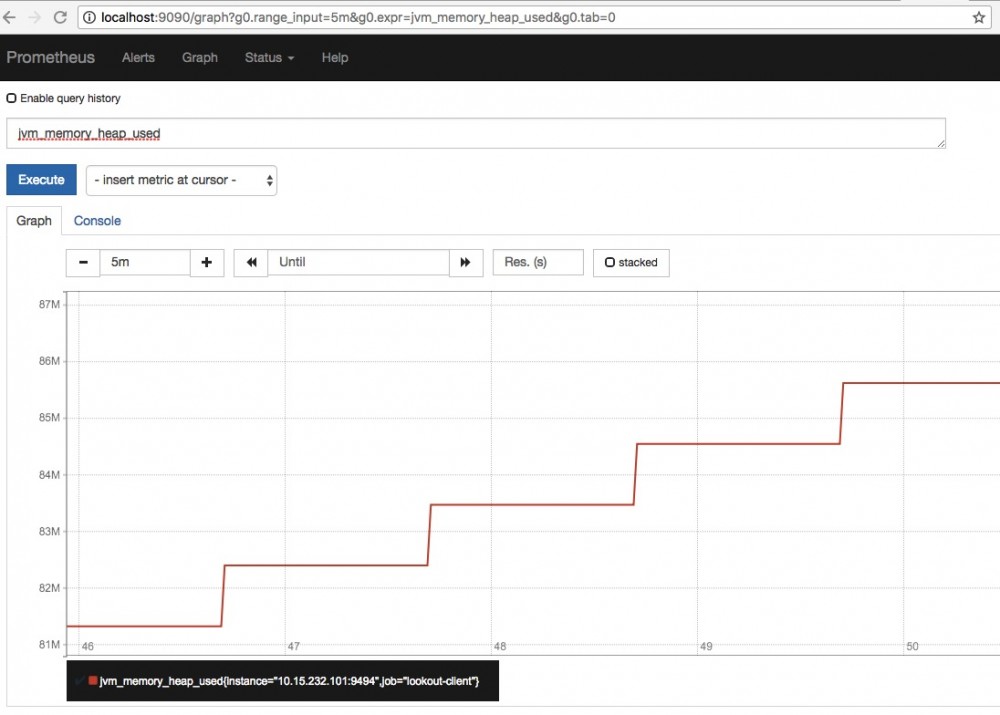
然后通过浏览器访问: http://localhost:9090,再通过 PromQL 查询即可查询到对应的 Metrics (比如: http://localhost:9090/graph?g0.range_input=1h&g0.expr=jvm_memory_heap_used&g0.tab=0 )。
正文到此结束
热门推荐









相关文章



Loading...
![[HBLOG]公众号](https://www.liuhaihua.cn/img/qrcode_gzh.jpg)

