基于Spring Security Oauth2的SSO单点登录+JWT权限控制实践 原 荐
概 述
在前文 《基于Spring Security和 JWT的权限系统设计》 之中已经讨论过基于 Spring Security 和 JWT 的权限系统用法和实践,本文则进一步实践一下基于 Spring Security Oauth2 实现的多系统单点登录( SSO )和 JWT 权限控制功能,毕竟这个需求也还是蛮普遍的。
代码已开源,放在文尾,需要自取
理论知识
在此之前需要学习和了解一些前置知识包括:
- Spring Security :基于
Spring实现的Web系统的认证和权限模块 - OAuth2 :一个关于授权(
authorization)的开放网络标准 - 单点登录 (SSO) :在多个应用系统中,用户只需要登录一次就可以访问所有相互信任的应用系统
- JWT :在网络应用间传递信息的一种基于
JSON的开放标准((RFC 7519),用于作为JSON对象在不同系统之间进行安全地信息传输。主要使用场景一般是用来在 身份提供者和服务提供者间传递被认证的用户身份信息
要完成的目标
Server
Client
SSO
基于此目标驱动,本文设计三个独立服务,分别是:
codesheep-server
codesheep-client1
codesheep-client2
多模块(Multi-Module)项目搭建
三个应用通过一个多模块的 Maven 项目进行组织,其中项目父 pom 中需要加入相关依赖如下:
<dependencies>

	<dependency>
		<groupId>org.springframework.boot</groupId>
		<artifactId>spring-boot-dependencies</artifactId>
		<version>2.0.8.RELEASE</version>
		<type>pom</type>
		<scope>import</scope>
	</dependency>

	<dependency>
		<groupId>io.spring.platform</groupId>
		<artifactId>platform-bom</artifactId>
		<version>Cairo-RELEASE</version>
		<type>pom</type>
		<scope>import</scope>
	</dependency>

	<dependency>
		<groupId>org.springframework.cloud</groupId>
		<artifactId>spring-cloud-dependencies</artifactId>
		<version>Finchley.SR2</version>
		<type>pom</type>
		<scope>import</scope>
	</dependency>

</dependencies>
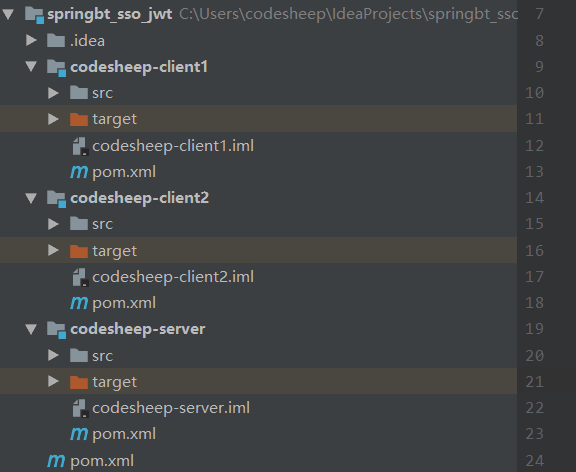
项目结构如下:
授权认证中心搭建
授权认证中心本质就是一个 Spring Boot 应用,因此需要完成几个大步骤:
-
pom中添加依赖
<dependencies>
	<dependency>
		<groupId>org.springframework.cloud</groupId>
		<artifactId>spring-cloud-starter-oauth2</artifactId>
	</dependency>
</dependencies>
- 项目
yml配置文件:
server:
  port: 8085
  servlet:
    context-path: /uac
即让授权中心服务启动在本地的 8085 端口之上
- 创建一个带指定权限的模拟用户
@Component
public class SheepUserDetailsService implements UserDetailsService {

    @Autowired
    private PasswordEncoder passwordEncoder;

    @Override
    public UserDetails loadUserByUsername(String s) throws UsernameNotFoundException {

        if( !"codesheep".equals(s) )
            throw new UsernameNotFoundException("用户" + s + "不存在" );

        return new User( s, passwordEncoder.encode("123456"), AuthorityUtils.commaSeparatedStringToAuthorityList("ROLE_NORMAL,ROLE_MEDIUM"));
    }
}
这里创建了一个用户名为 codesheep ,密码 123456 的模拟用户,并且赋予了 普通权限 ( ROLE_NORMAL )和 中等权限 ( ROLE_MEDIUM )
- 认证服务器配置
AuthorizationServerConfig
@Configuration
@EnableAuthorizationServer
public class AuthorizationServerConfig extends AuthorizationServerConfigurerAdapter {

    @Override
    public void configure(ClientDetailsServiceConfigurer clients) throws Exception {

        // 定义了两个客户端应用的通行证
        clients.inMemory()
                .withClient("sheep1")
                .secret(new BCryptPasswordEncoder().encode("123456"))
                .authorizedGrantTypes("authorization_code", "refresh_token")
                .scopes("all")
                .autoApprove(false)
                .and()
                .withClient("sheep2")
                .secret(new BCryptPasswordEncoder().encode("123456"))
                .authorizedGrantTypes("authorization_code", "refresh_token")
                .scopes("all")
                .autoApprove(false);
    }

    @Override
    public void configure(AuthorizationServerEndpointsConfigurer endpoints) throws Exception {

        endpoints.tokenStore(jwtTokenStore()).accessTokenConverter(jwtAccessTokenConverter());
        DefaultTokenServices tokenServices = (DefaultTokenServices) endpoints.getDefaultAuthorizationServerTokenServices();
        tokenServices.setTokenStore(endpoints.getTokenStore());
        tokenServices.setSupportRefreshToken(true);
        tokenServices.setClientDetailsService(endpoints.getClientDetailsService());
        tokenServices.setTokenEnhancer(endpoints.getTokenEnhancer());
        tokenServices.setAccessTokenValiditySeconds((int) TimeUnit.DAYS.toSeconds(1)); // 一天有效期
        endpoints.tokenServices(tokenServices);
    }

    @Override
    public void configure(AuthorizationServerSecurityConfigurer security) throws Exception {
        security.tokenKeyAccess("isAuthenticated()");
    }

    @Bean
    public TokenStore jwtTokenStore() {
        return new JwtTokenStore(jwtAccessTokenConverter());
    }

    @Bean
    public JwtAccessTokenConverter jwtAccessTokenConverter(){
        JwtAccessTokenConverter converter = new JwtAccessTokenConverter();
        converter.setSigningKey("testKey");
        return converter;
    }

}
这里做的最重要的两件事: 一是 定义了两个客户端应用的通行证( sheep1 和 sheep2 ); 二是 配置 token 的具体实现方式为 JWT Token 。
- Spring Security安全配置
SpringSecurityConfig
@Configuration
public class SpringSecurityConfig extends WebSecurityConfigurerAdapter {

    @Override
    @Bean
    public AuthenticationManager authenticationManager() throws Exception {
        return super.authenticationManager();
    }

    @Autowired
    private UserDetailsService userDetailsService;

    @Bean
    public PasswordEncoder passwordEncoder() {
        return new BCryptPasswordEncoder();
    }

    @Bean
    public DaoAuthenticationProvider authenticationProvider() {
        DaoAuthenticationProvider authenticationProvider = new DaoAuthenticationProvider();
        authenticationProvider.setUserDetailsService(userDetailsService);
        authenticationProvider.setPasswordEncoder(passwordEncoder());
        authenticationProvider.setHideUserNotFoundExceptions(false);
        return authenticationProvider;
    }

    @Override
    protected void configure(HttpSecurity http) throws Exception {

        http
                .requestMatchers().antMatchers("/oauth/**","/login/**","/logout/**")
                .and()
                .authorizeRequests()
                .antMatchers("/oauth/**").authenticated()
                .and()
                .formLogin().permitAll();
    }

    @Override
    protected void configure(AuthenticationManagerBuilder auth) throws Exception {
        auth.authenticationProvider(authenticationProvider());
    }

}
客户端应用创建和配置
本文创建两个客户端应用: codesheep-client1 和 codesheep-client2 ,由于两者类似,因此只以其一为例进行讲解
- SSO客户端应用配置类
ClientWebsecurityConfigurer
@Configuration
@EnableWebSecurity
@EnableGlobalMethodSecurity(prePostEnabled = true)
@EnableOAuth2Sso
public class ClientWebsecurityConfigurer extends WebSecurityConfigurerAdapter {

    @Override
    public void configure(HttpSecurity http) throws Exception {
        http.antMatcher("/**").authorizeRequests()
                .anyRequest().authenticated();
    }
}
复杂的东西都交给注解了!
- application.yml配置
auth-server: http://localhost:8085/uac
server:
  port: 8086

security:
  oauth2:
    client:
      client-id: sheep1
      client-secret: 123456
      user-authorization-uri: ${auth-server}/oauth/authorize
      access-token-uri: ${auth-server}/oauth/token
    resource:
      jwt:
        key-uri: ${auth-server}/oauth/token_key
这里几项配置都非常重要,都是需要和前面搭建的授权中心进行通信的
- 创建测试控制器
TestController
@RestController
public class TestController {

    @GetMapping("/normal")
    @PreAuthorize("hasAuthority('ROLE_NORMAL')")
    public String normal( ) {
        return "normal permission test success !!!";
    }

    @GetMapping("/medium")
    @PreAuthorize("hasAuthority('ROLE_MEDIUM')")
    public String medium() {
        return "medium permission test success !!!";
    }

    @GetMapping("/admin")
    @PreAuthorize("hasAuthority('ROLE_ADMIN')")
    public String admin() {
        return "admin permission test success !!!";
    }
}
此测试控制器包含三个接口,分别需要三种权限( ROLE_NORMAL 、 ROLE_MEDIUM 、 ROLE_ADMIN ),待会后文会一一测试看效果
实验验证
- 启动授权认证中心
codesheep-server(启动于本地8085端口) - 启动客户端应用
codesheep-client1(启动于本地8086端口) - 启动客户端应用
codesheep-client2(启动于本地8087端口)
首先用浏览器访问客户端1 ( codesheep-client1 ) 的测试接口: localhost:8086/normal ,由于此时并没有过用户登录认证,因此会自动跳转到授权中心的登录认证页面: http://localhost:8085/uac/login :
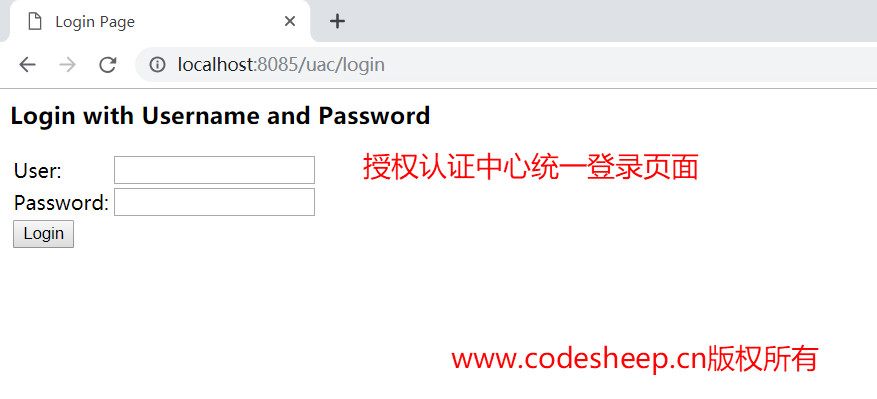
输入用户名 codesheep ,密码 123456 ,即可登录认证,并进入授权页面:
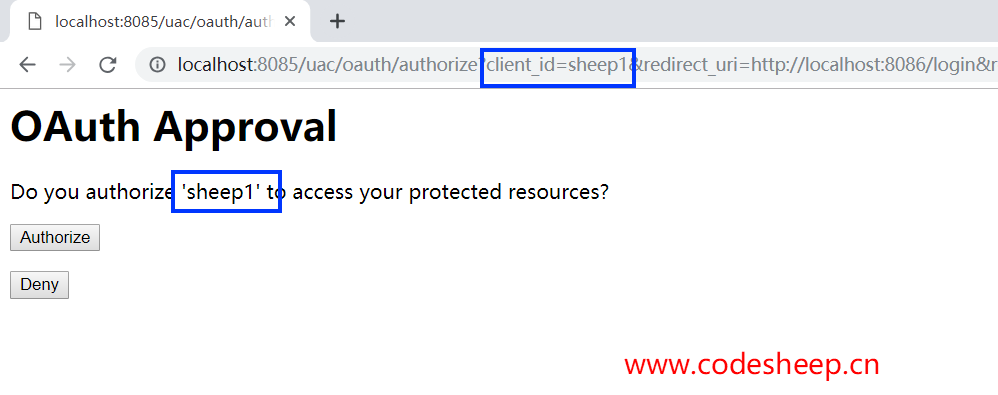
同意授权后,会自动返回之前客户端的测试接口:
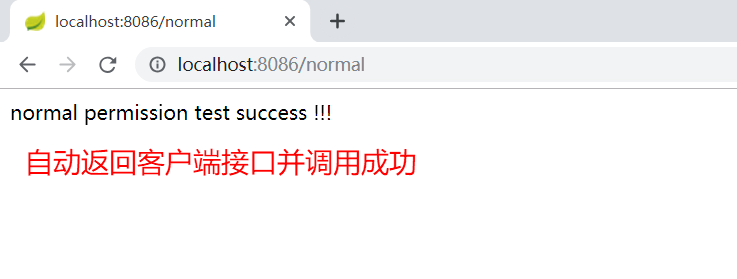
此时我们再继续访问客户端1 ( codesheep-client1 ) 的测试接口: localhost:8086/medium ,发现已经直接可以调用而无需认证了:
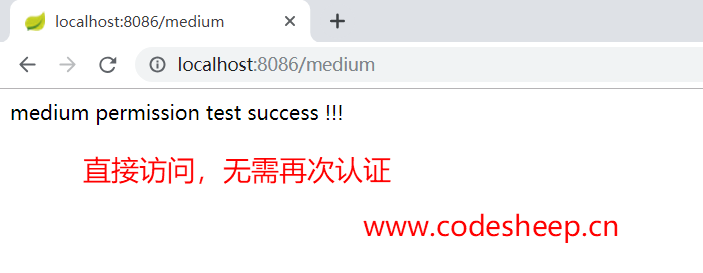
由于 localhost:8086/normal 和 localhost:8086/medium 要求的接口权限,用户 codesheep 均具备,所以能顺利访问,接下来再访问一下更高权限的接口: localhost:8086/admin :
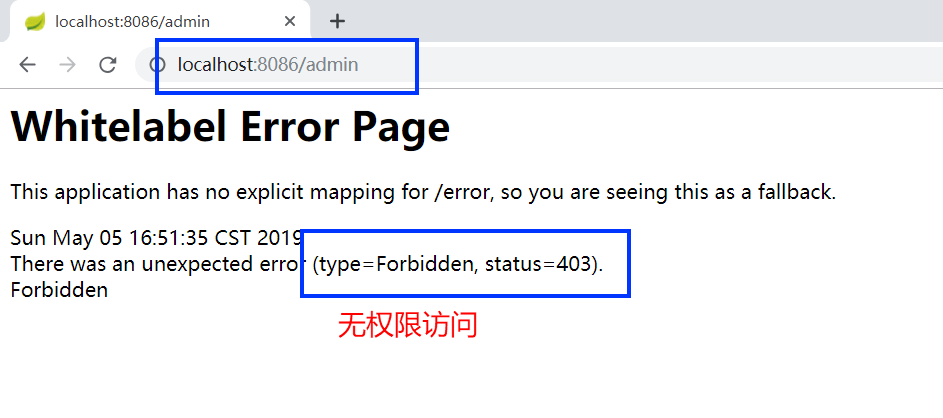
好了,访问客户端1 ( codesheep-client1 ) 的测试接口到此为止,接下来访问外挂的客户端2 ( codesheep-client2 ) 的测试接口: localhost:8087/normal ,会发现此时会自动跳到授权页:
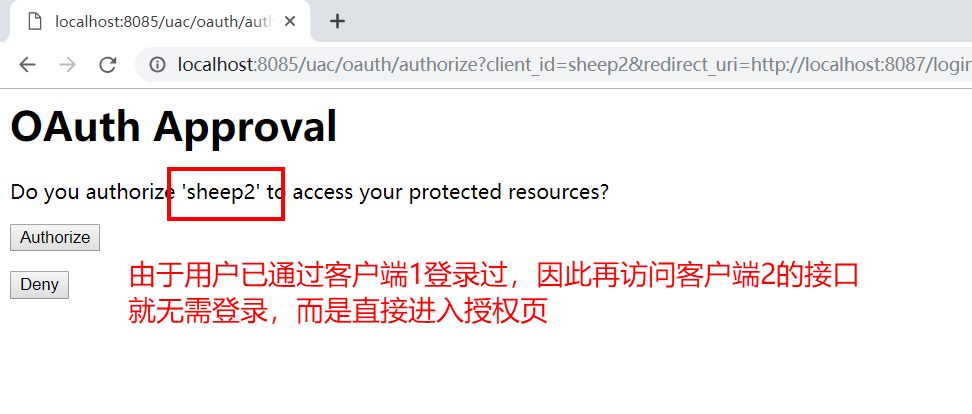
授权完成之后就可以顺利访问客户端2 ( codesheep-client2 ) 的接口:
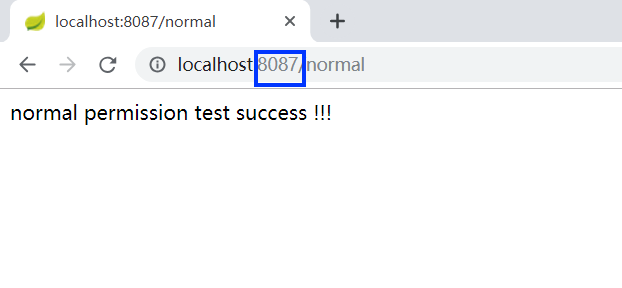
这就验证了单点登录 SSO 的功能了!
未完待续
受篇幅所限,本文应该说实践了一下精简流程的: SSO 单点登录和 JWT 权限控制,还有很多可以复杂和具化的东西可以实现,比如:
- 客户端
client凭据 和 用户user的凭据可以用数据库进行统一管理 - 认证
token也可以用数据库或缓存进行统一管理 - 授权认证中心的统一登录页面可以自定义成需要的样子
- 认证中心的授权页也可以自定义,甚至可以去掉
- 包括一些异常提示也可以自定义
总之,尽情地折腾去吧!
本文开源代码地址在此:Spring-Boot-In-Action,需要自取
写在最后
由于能力有限,若有错误或者不当之处,还请大家批评指正,一起学习交流!
- My Personal Blog: CodeSheep 程序羊
正文到此结束
- 本文标签: dependencies rmi pom Security map Spring Security json 测试 client ORM IDE equals REST logo maven Authorization 安全 Spring Boot App 服务器 build js bean 数据 权限控制 组织 端口 Word cat id 需求 provider web https Service UI token list authenticate http 数据库 MQ 代码 tk 开源 spring servlet Action 配置 本质 key 认证 src tar IO 管理 缓存
- 版权声明: 本文为互联网转载文章,出处已在文章中说明(部分除外)。如果侵权,请联系本站长删除,谢谢。
- 本文海报: 生成海报一 生成海报二
热门推荐









相关文章

近期评论
-
谢谢
-
https://www.newcmy.com/register?aff=HBVX建议您试试草莓云机场,可以流畅观看youtube和tiktok,上reddit/x也没有问题,还有各种ai优化节点。
-
-
-
想购买您这个站,我的联系方式QQ741756694微信同步 能卖联系
-
-
-
-
-
https://www.liuhaihua.cn/archives/40657.html 这篇博客中的图片打不开了
Loading...
![[HBLOG]公众号](https://www.liuhaihua.cn/img/qrcode_gzh.jpg)

