HttpClient详解
HttpClient是客户端的http通信实现库,这个类库的作用是接收和发送http报文,使用这个类库,我们对于http的操作会变得简单一些;
一、HttpClient理论基础之HTTP
1.1 http协议
Http协议(Hyper Text Transfer Protocol,超文本传输协议)是TCP/IP协议的一个应用层协议,用于定义WEB浏览器和WEB服务器之间交换数据的过程以及数据本身的格式。 HTTP协议的特点:无状态 。
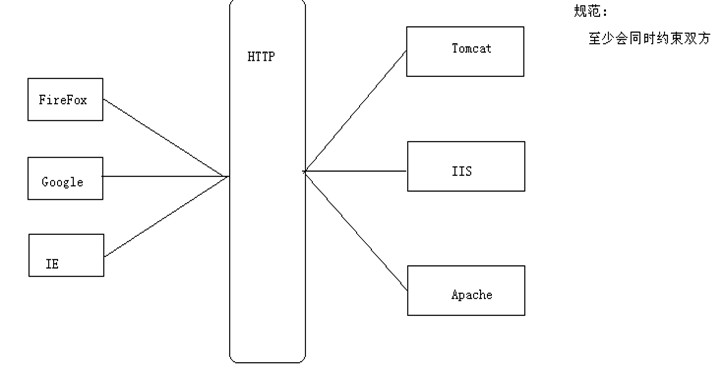
1.2 HTTP协议到底约束了什么:
- 约束了浏览器以何种格式向服务端发送数据
- 约束了服务器应该以何种格式来接受客户端发送的数据
- 约束了服务器应该一何种格式来反馈数据给浏览器
- 约束了浏览器以何种格式来接收服务器反馈的数据
- 浏览器给服务器发送数据:一次请求
- 服务器给浏览器反馈数据:一次响应
1.3 HTTP协议版本
HTTP协议版本包括:HTTP/1.0和HTTP/1.1以及HTTP-NG
HTTP规范:
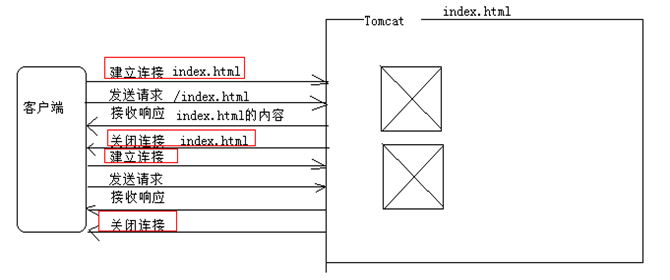
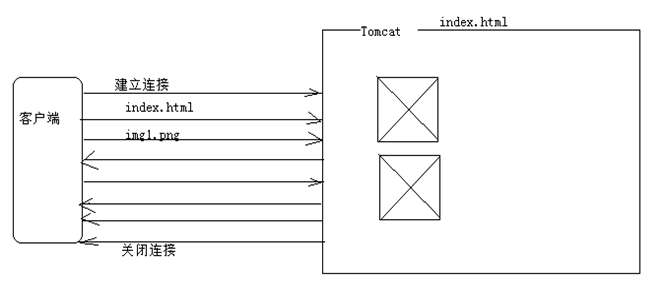
在HTTP1.0版本,若请求的有N个资源,得建立N次连接,发送N次请求,接收N次响应,关闭N次连接。所以,HTTP1.0的缺点是: 每请求一个资源都要建立单独的建立新的来凝结,请求完后关闭连接 。这个缺点HTTP1.1给出了解决方案,即: 能在一次连接之间,多次请求,多次响应,响应完之后再关闭连接 。HTTP1.1的特点就是合理的利用连接资源,在一个TCP连接上可以传送多个HTTP请求和响应。
1.4 HTTP请求消息和响应信息的结构
- 请求消息:
HTTP请求消息包括:一个请求行,若干请求头,以及实体内容,其中一些请求头和实体内容都是可选的。
HTTP响应消息包括:一个状态行,若干响应头,以及实体内容,其中一些消息头和实体内容都是可选的。
常见的响应状态码有:
* 200:表示OK;
* 404:表示请求的资源路径不存在
* 500:表示服务器有问题。
1.5 HTTP常用的请求方式:GET和POST
- GET请求方式
GET请求资源包括请求参数:第一个参数使用?和资源连接,其他参数使用&符号连接,GET请求信息限制不超过1KB
如:https://www.baidu.com/s?wd=http&rsv_spt=1
GET请求暴露了请求信息。 -
POST请求方式
POST请求行中不再有请求信息,参数全部在请求的实体中;POST隐藏了请求信息,较安全;并且POST方式没有显示请求的数据大小
二、HttpClient 使用
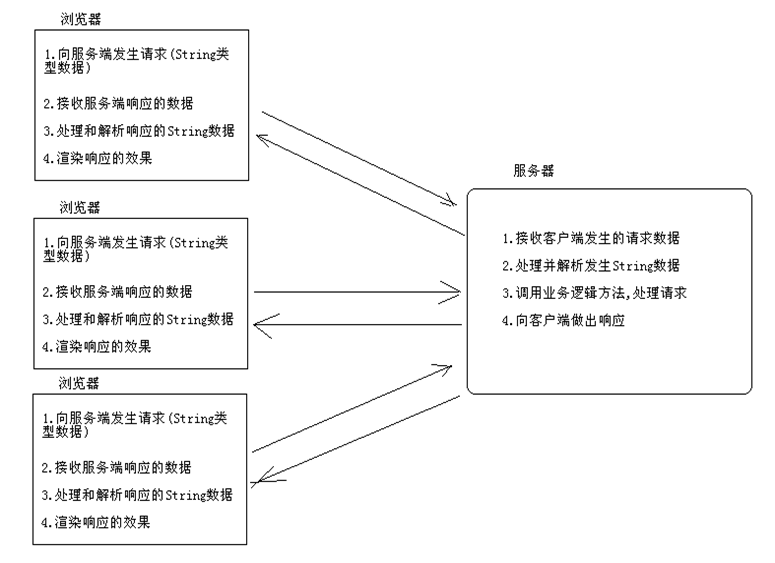
HttpClient是Apache Jakarta Common下的子项目,用来提供高效的、最新的、功能丰富的支持HTTP协议的客户端编程工具包。HTTP Client和浏览器有点像,都可以用来发送请求,接收服务端响应的数据。但它不是浏览器,没有用户界面。HttpClient是一个HTTP通信库,只通过其API用于传输和接受HTTP消息。
-
HttpClient下载
可在官网直接下载:http://hc.apache.org/downloads.cgi,目前
最新版本:4.5.9;(HttpClient3和HttpClient4接口差别比较大,3版本的代码放到4里可能会有报错)
若项目为maven项目,可直接添加maven依赖:
<!-- https://mvnrepository.com/artifact/org.apache.httpcomponents/httpcore --  暂时还不知道有什么用>
        <dependency>
            <groupId>org.apache.httpcomponents</groupId>
            <artifactId>httpcore</artifactId>
            <version>4.4.10</version>
        </dependency>

        <!-- https://mvnrepository.com/artifact/org.apache.httpcomponents/httpclient -->
        <dependency>
            <groupId>org.apache.httpcomponents</groupId>
            <artifactId>httpclient</artifactId>
            <version>4.5.9</version>
        </dependency>
三、HttpClient API的常用方法
HttpClient 支持了在 HTTP / 1.1 规范中定义的所有 HTTP 方法:GET,HEAD,POST,PUT,DELETE,TRACE 和 OPTIONS。
对于每个方法类型,都有一个特定的类来支持:HttpGet, HttpHead,HttpPost, HttpPut,HttpDelete, HttpTrace,和 HttpOptions。
HttpClient使用步骤
- 创建HttpClient对象;
- 创建请求方法的实例,并指定请求URL。如果需要发送GET请求,创建HttpGet对象;如果需要发送POST请求,创建HttpPost对象。
- 如果需要发送请求参数,可调用setEntity(HttpEntity entity)方法来设置请求参数;
- 调用HttpClient对象的execute()方法来发送请求 释放链接。
- 获取响应信息
我们给出httpclient发送GET请求的例子:
// 创建HttpClient,获得Http客户端(可以理解为一个浏览器)
        CloseableHttpClient httpClient = HttpClients.createDefault();
        //使用httpclientbuilder来创建httpclient对象
        //CloseableHttpClient httpClient1 = HttpClients.custom().build();

        //设置URI
        String uri = "https://www.tryenough.com";
        // 创建Get请求
        HttpGet httpGet = new HttpGet(uri);
        try {
            //请求执行,获取响应
            CloseableHttpResponse closeableHttpResponse = httpClient.execute(httpGet);
            //获取响应实体
            HttpEntity resEntity = closeableHttpResponse.getEntity();
            System.out.println(resEntity);
            //输出响应信息
            System.out.println(EntityUtils.toString(resEntity,"utf-8"));
            closeableHttpResponse.close();
        } catch (IOException e) {
            e.printStackTrace();
        }

        try {
            httpClient.close();
        } catch (IOException e) {
            e.printStackTrace();
        }
GET请求的参数传递是通过URL拼接来实现的,所以,我们想发送带参数的get请求,可直接拼接在ulr后:
//设置带参数的URL
HttpGet httpget = new HttpGet(
     "http://www.google.com/search?hl=en&q=httpclient&btnG=Google+Search&aq=f&oq=");
HtttpClient给我们提供一个URIBuilder 工具类,使创建和修改uri请求变得简单
URI uri = new URIBuilder()
        .setScheme("http")
        .setHost("www.google.com")
        .setPath("/search")
        .setParameter("q", "httpclient")
        .setParameter("btnG", "Google Search")
        .setParameter("aq", "f")
        .setParameter("oq", "")
        .build();
HttpGet httpget = new HttpGet(uri);
System.out.println(httpget.getURI());
输入结果:
http://www.google.com/search?q=httpclient&btnG=Google+Search&aq=f&oq=
2.使用httpClient发送POST请求
- Post的请求参数是放在请求实体中的,所以,使用post传递参数,我们可以直接放到实体中调用httpEntity的setEntity来设置参数
File file = new File("somefile.txt");
FileEntity entity = new FileEntity(file,
    ContentType.create("text/plain", "UTF-8"));
httppost.setEntity(entity);
- 如果需要设置<key,value>的形式,我们可以使用httpclient给我们提供的
List<NameValuePair> formparams = new ArrayList<NameValuePair>();
formparams.add(new BasicNameValuePair("param1", "value1"));
formparams.add(new BasicNameValuePair("param2", "value2"));
UrlEncodedFormEntity entity = new UrlEncodedFormEntity(formparams, Consts.UTF_8);
HttpPost httppost = new HttpPost("http://localhost/handler.do");
httppost.setEntity(entity);
发送post请求
//创建httpclient对象
CloseableHttpClient client = HttpClients.createDefault();
//创建请求对象
HttpPost httpPost = new HttpPost(url);
//设置参数
List<NameValuePair> formparams = new ArrayList<NameValuePair>();
formparams.add(new BasicNameValuePair("param1", "value1"));
formparams.add(new BasicNameValuePair("param2", "value2"));
UrlEncodedFormEntity entity = new UrlEncodedFormEntity(formparams, Consts.UTF_8);
httppost.setEntity(entity);
//输出
System.out.println("请求地址:"+url);
System.out.println("请求参数:"+formparams.toString());

//设置header信息
httpPost.setHeader("Content-type", "application/x-www-form-urlencoded");
httpPost.setHeader("User-Agent", "Mozilla/4.0 (compatible; MSIE 5.0; Windows NT; DigExt)");

//执行请求
CloseableHttpResponse response = client.execute(httpPost);
//获取结果
HttpEntity entity = response.getEntity();
        if (entity != null) {
        //按指定编码转换结果实体为String类型
            res = EntityUtils.toString(entity, encoding);
        }
        //释放链接
        response.close();
四、并发的场景下使用HttpClient
- 因为发请求耗时,特别是客户端,为了不阻塞主线程(也就是用户操作的ui线程),都要把网络请求放在子线程中进行。
MyThread thread1 = new MyThread();
    MyThread thread2 = new MyThread();
    thread1.start();
    thread2.start();
    class MyThread extends Thread{
            @Override
            public void run() {
                //发送get和post请求的地方
                get...
            }
    }
热度: 7
正文到此结束
热门推荐









相关文章

近期评论
-
ws0132613@gmail.comhttps://getmacos.com/gopanel/william smith
-
谢谢
-
https://www.newcmy.com/register?aff=HBVX建议您试试草莓云机场,可以流畅观看youtube和tiktok,上reddit/x也没有问题,还有各种ai优化节点。
-
-
-
想购买您这个站,我的联系方式QQ741756694微信同步 能卖联系
-
-
-
-
Loading...
![[HBLOG]公众号](https://www.liuhaihua.cn/img/qrcode_gzh.jpg)

