docker-compose 部署 Vue+SpringBoot 前后端分离项目
一、前言
本文将通过 docker-compose 来部署前端Vue项目到Nginx中,和运行后端SpringBoot项目
服务器基本环境:
- CentOS7.3
- Dokcer
- MySQL
二、docker-compose 部署Vue+SpringBoot 前后端分离项目
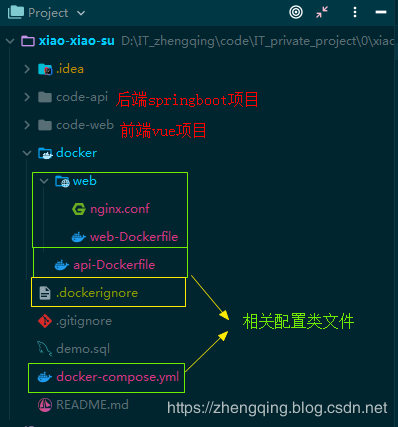
整体项目配置结构,这里在不影响原来项目的结构,因此将所有配置文件都提出来存放到docker文件夹内了,但注意 docker-compose 文件须放到项目总的根目录下哦!
1、新增后端所需配置文件 api-Dockerfile
# 指定基础镜像
FROM maven:3.5.4-jdk-8
# 维护者信息
MAINTAINER zhengqing "960869719@qq.com"

RUN echo "-------------------- api环境配置 --------------------"

# 暴露9101端口
EXPOSE 9101
# 设置环境编码UTF-8
ENV LANG C.UTF-8
# 运行 - 配置容器,使其可执行化
#ENTRYPOINT ["java", "-jar", "app.jar","--spring.profiles.active=dev"]
2、新增前端Vue所需配置文件 web-Dockerfile 、 nginx.conf 、 .dockerignore
web-Dockerfile : 安装依赖,打包生成运行访问所需资源文件,然后存放到nginx下的html目录中运行
# node镜像
FROM node:latest as build-stage
# 维护者信息
MAINTAINER zhengqing "960869719@qq.com"

RUN echo "-------------------- web环境配置 --------------------"

# 指定接下来的工作路径为/app  - 类似于cd命令
WORKDIR /app
# 拷贝前端项目到app目录下
COPY ./code-web .

# 设置淘宝npm镜像
RUN npm install -g cnpm --registry=https://registry.npm.taobao.org
# 安装依赖
RUN cnpm install

# 打包 - 目的:丢到nginx下跑
RUN cnpm run build:prod

# 前端项目运行命令
#CMD ["npm","run","start"]


# ======================== 上:npm打包  下:nginx运行 ========================
# nginx镜像
FROM nginx:1.15.3-alpine as production-stage
# 维护者信息
MAINTAINER zhengqing "960869719@qq.com"

# 移除nginx容器的default.conf文件、nginx配置文件
RUN rm /etc/nginx/conf.d/default.conf
RUN rm /etc/nginx/nginx.conf
# 把主机的nginx.conf文件复制到nginx容器的/etc/nginx文件夹下
COPY ./docker/web/nginx.conf /etc/nginx/
# 拷贝前端vue项目打包后生成的文件到nginx下运行
COPY --from=build-stage /app/dist /usr/share/nginx/html

# 暴露8101端口
EXPOSE 8101

# 注:CMD不同于RUN,CMD用于指定在容器启动时所要执行的命令,而RUN用于指定镜像构建时所要执行的命令。
#    RUN指令创建的中间镜像会被缓存,并会在下次构建中使用。如果不想使用这些缓存镜像,可以在构建时指定--no-cache参数,如:docker build --no-cache

# 使用daemon off的方式将nginx运行在前台保证镜像不至于退出
CMD ["nginx", "-g", "daemon off;"]
nginx.conf
user  nginx;
worker_processes  1;

error_log  /var/log/nginx/error.log warn;
pid        /var/run/nginx.pid;

events {
    worker_connections  1024;
}

http {
    include       /etc/nginx/mime.types;
    default_type  application/octet-stream;

    log_format  main  '$remote_addr - $remote_user [$time_local] "$request" '
                      '$status $body_bytes_sent "$http_referer" '
                      '"$http_user_agent" "$http_x_forwarded_for"';

    access_log  /var/log/nginx/access.log  main;

    sendfile        on;

    keepalive_timeout  65;

    # include /etc/nginx/conf.d/*.conf;

      server {
        listen       8101;
        charset utf-8;
        server_name  www.zhengqing520.com;# 服务器地址或绑定域名

        # start ---------------------------------------------------------------------------------------------

        location / {
           root   /usr/share/nginx/html;
           try_files $uri $uri/ /index.html;
        }

        # end ---------------------------------------------------------------------------------------------

        error_page   500 502 503 504  /50x.html;
        location = /50x.html {
            root   /usr/share/nginx/html;
        }
   }
}
.dockerignore 作用:在传递给docker引擎时忽略掉不必要的文件或文件夹。
/code-web/node_modules
3、 docker-compose.yml 作用:编排容器执行顺序,相对于一个一个docker run方式运行项目更方便
version: '3'
services:
  api:                                  # 后端springboot容器
    container_name: xiao-xiao-su-api    # 容器名为'xiao-xiao-su-api'
    restart: always                     # 重启策略: 容器退出时总是重启容器
    build:
      context: ./                       # 指定设定上下文根目录,然后以该目录为准指定Dockerfile
      dockerfile: ./docker/api-Dockerfile
    working_dir: /app                   # 设置工作目录为容器内的app文件夹
    environment:
      TZ: Asia/Shanghai
    volumes:                            # 挂载文件
      - ./code-api:/app                 # 将主机的code-api文件夹(java代码)映射到容器内的app文件夹
      - ./logs/:/app/log                # 映射容器产生的日志到主机的logs文件夹
    ports:                              # 映射端口
      - "9101:9101"
    command: mvn clean spring-boot:run -Dspring-boot.run.profiles=dev '-Dmaven.test.skip=true' # 容器创建后执行命令运行springboot项目

  web:                                  # 前端node容器(运行nginx中的Vue项目)
    container_name: xiao-xiao-su-web    # 容器名为'xiao-xiao-su-web'
    restart: always                     # 重启策略: 容器退出时总是重启容器
    build:
      context: ./                       # 指定设定上下文根目录,然后以该目录为准指定Dockerfile
      dockerfile: docker/web/web-Dockerfile
    environment:
      TZ: Asia/Shanghai
    ports:
      - "8101:8101"                      # 映射端口
    depends_on:                          # 依赖于api容器,被依赖容器启动后此web容器才可启动
      - api
三、服务器运行
将项目丢到服务器上,进入项目根目录依次执行如下命令即可
# 1. 构建镜像
docker-compose build
# 2. 运行服务
docker-compose up -d
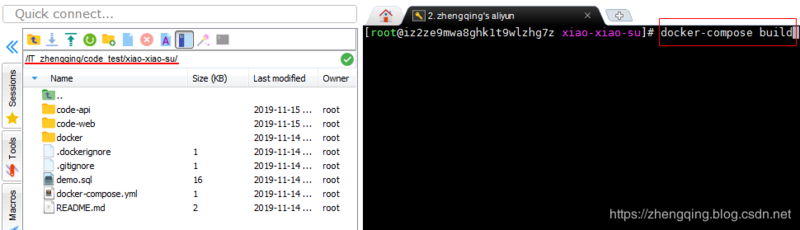
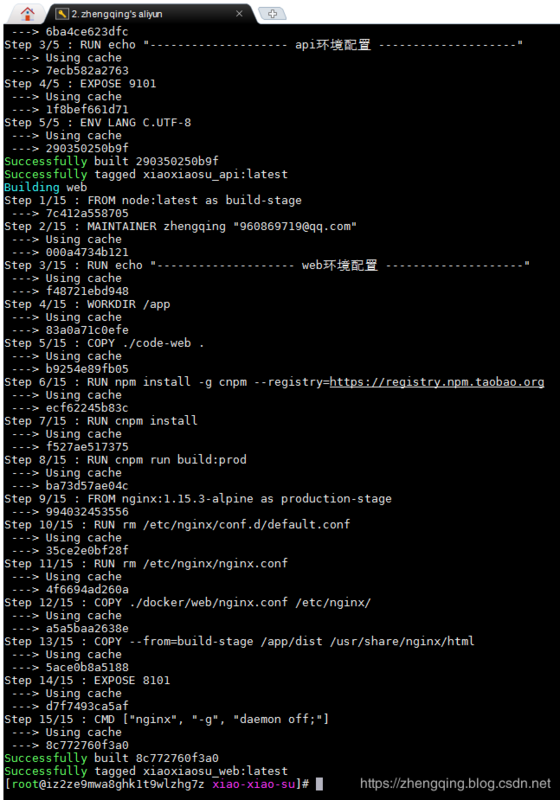

温馨小提示:第一次构建的时候会很慢哦,可以先坐下来喝杯凉茶 ~
四、访问测试
前端页面: http://www.zhengqing520.com:8101/xiao-xiao-su/dashboard
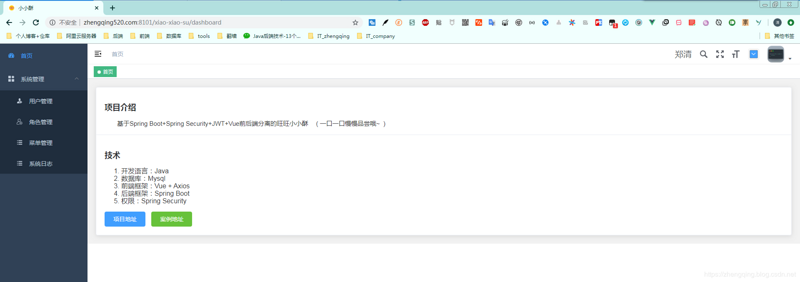
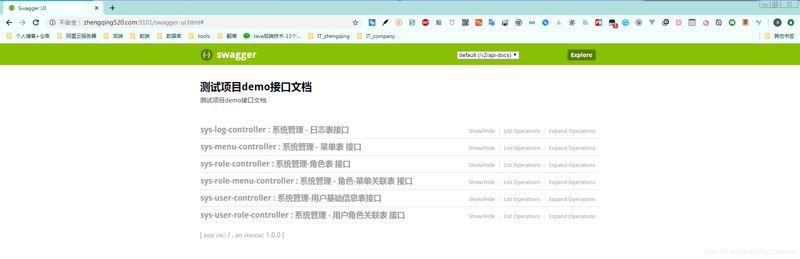
后端接口: http://www.zhengqing520.com:9101/swagger-ui.html#
四、总结
- 部署vue项目:
npm拉取项目所需依赖node_modules-> 打包生成dist文件夹 -> 拷贝到nginx中运行 - 部署springboot项目:小编这里采用的是maven命令运行,其次也可通过
mvn install -Dmaven.test.skip=true->cd target->java -jar ***.jar运行 - 通过
docker-compose编排一下执行顺序,①后端api容器 ②前端web容器 - 放到服务器下通过
docker-compose build构建镜像 ->docker-compose up -d启动应用服务
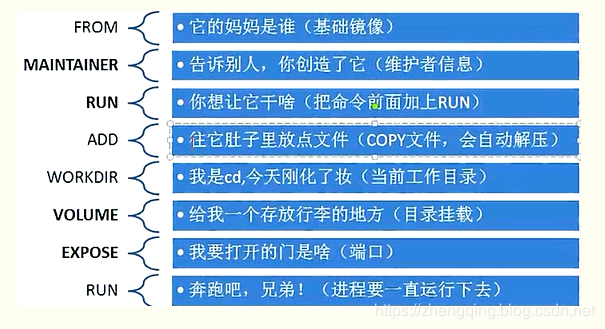
关于 Dockerfile 的命令理解,这里贴一张网上看见比较有意思的图吧
案例demo源码
https://github.com/zhengqingya/xiao-xiao-su
正文到此结束
- 本文标签: web 总结 node cache sql stream HTML 测试 src git Dockerfile API java 参数 remote ORM centos Agent App 服务器 dist ip springboot UI spring REST 端口 Service cat 缓存 域名 Nginx build id 配置 部署 目录 list cmd http tar Dashboard 代码 root Connection maven IO 安装 tag mysql Docker 源码 主机 https docker-compose GitHub
- 版权声明: 本文为互联网转载文章,出处已在文章中说明(部分除外)。如果侵权,请联系本站长删除,谢谢。
- 本文海报: 生成海报一 生成海报二
热门推荐









相关文章



Loading...
![[HBLOG]公众号](https://www.liuhaihua.cn/img/qrcode_gzh.jpg)

