SpringBoot开发案例之Nacos注册中心管理
点击▲关注 “ 爪哇笔记 ” 给公众号标星置顶
更多精彩 第一时间直达

前言
在之前的 Dubbo 服务开发中,我们一般使用 Zookeeper 作为注册中心,同时还需要部署 Dubbo 监控中心和管理后台。
Nacos 注册中心
Nacos 是阿里巴巴的开源的项目,全称 Naming Configuration Service ,专注于服务发现和配置管理领域。
Nacos 致力于帮助您发现、配置和管理微服务。Nacos 提供了一组简单易用的特性集,帮助您快速实现动态服务发现、服务配置、服务元数据及流量管理。
Nacos 生态图
如 Nacos 全景图所示,Nacos 无缝支持一些主流的开源生态,例如
Spring Cloud Apache Dubbo and Dubbo Mesh TODO Kubernetes and CNCF TODO。使用 Nacos 简化服务发现、配置管理、服务治理及管理的解决方案,让微服务的发现、管理、共享、组合更加容易。
Nacos Spring Boot 快速开始
<!-- Dubbo Nacos registry dependency -->
<dependency>
<groupId>com.alibaba</groupId>
<artifactId>dubbo-registry-nacos</artifactId>
<version>2.6.7</version>
</dependency>
<!-- Dubbo dependency -->
<dependency>
<groupId>com.alibaba</groupId>
<artifactId>dubbo</artifactId>
<version>2.6.5</version>
</dependency>
<!-- Alibaba Spring Context extension -->
<dependency>
<groupId>com.alibaba.spring</groupId>
<artifactId>spring-context-support</artifactId>
<version>1.0.2</version>
</dependency>
<!--Dubbo 依赖-->
<dependency>
<groupId>io.netty</groupId>
<artifactId>netty-all</artifactId>
<version>4.1.32.Final</version>
</dependency>
配置文件:
## application
dubbo.application.name = spring-boot-pay
dubbo.registry.address = nacos://47.104.197.9:8848
dubbo.protocol.name=dubbo
dubbo.protocol.port=-1
启动类引入 Dubbo 注解:
@EnableDubbo
@SpringBootApplication
public class Application {

private static final Logger logger = LoggerFactory.getLogger(AliPayServiceImpl.class);

public static void main(String[] args){
SpringApplication.run(Application.class, args);
logger.info("启动成功");
}
}
接口实现:
//省略部分代码
import com.alibaba.dubbo.config.annotation.Service;
@Service(group = "itstyle-nacos", retries = 1, timeout = 10000)
public class AliPayServiceImpl implements IAliPayService {

}
打包接口:
<!-- 打包接口 https://blog.52itstyle.vip -->
<plugin>
<groupId>org.apache.maven.plugins</groupId>
<artifactId>maven-jar-plugin</artifactId>
<executions>
<execution>
<id>service</id>
<phase>package</phase>
<goals>
<goal>jar</goal>
</goals>
<configuration>
<classesDirectory>${project.build.directory}/classes</classesDirectory>
<finalName>pay-service</finalName>
<outputDirectory>${project.build.directory}</outputDirectory>
<includes>
<include>com/itstyle/modules/alipay/service/*.*</include>
<include>com/itstyle/modules/unionpay/service/*.*</include>
<include>com/itstyle/modules/weixinpay/service/*.*</include>
<include>com/itstyle/common/model/*.*</include>
</includes>
</configuration>
</execution>
</executions>
</plugin>
服务引用:
/**
* 支付宝支付
* 创建者 爪哇笔记 https://blog.52itstyle.vip
* 创建时间    2019年7月20日
*/
@Controller
@RequestMapping(value = "alipay")
public class AliPayController {
@Reference
private IAliPayService aliPayService;

}
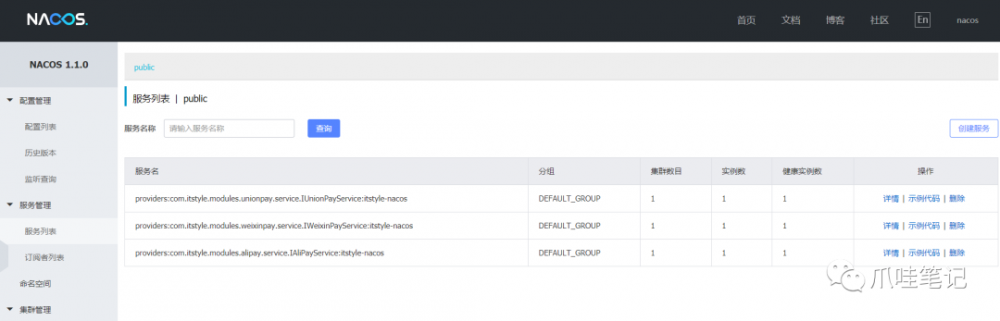
启动项目,登录到管理控制中心,如果发现有数据,说明注册成功。
小结
一个 Nacos 就轻松搞定了,还捎带着配置管理中心,一举两得,何乐不为。
参考案例
https://gitee.com/52itstyle/spring-boot-pay/tree/spring-boot-nacos-pay

点 在看 再走呗!
正文到此结束
- 本文标签: plugin apache 微服务 map CTO build Spring Boot https 数据 开发 Service spring 注册中心 zookeeper 时间 Uber id git UI value http Spring cloud 阿里巴巴 代码 dubbo IO ip 支付宝 2019 Kubernetes src 专注 cat Netty 开源 NIO maven 配置 部署 App lib springboot 管理 final
- 版权声明: 本文为互联网转载文章,出处已在文章中说明(部分除外)。如果侵权,请联系本站长删除,谢谢。
- 本文海报: 生成海报一 生成海报二
热门推荐









相关文章

近期评论
-
ws0132613@gmail.comhttps://getmacos.com/gopanel/william smith
-
谢谢
-
https://www.newcmy.com/register?aff=HBVX建议您试试草莓云机场,可以流畅观看youtube和tiktok,上reddit/x也没有问题,还有各种ai优化节点。
-
-
-
想购买您这个站,我的联系方式QQ741756694微信同步 能卖联系
-
-
-
-
Loading...
![[HBLOG]公众号](https://www.liuhaihua.cn/img/qrcode_gzh.jpg)

