Spring sidecar模式纳入TF-Serving(三):TF-Serving嵌入SpringCloud
前言
上一篇把TF-Serving源码编译后,就可以修改代码把TF-Serving嵌入SpringCloud了。
TF-Serving增加health接口
添加proto
在tensorflow_serving/apis 下添加一个health.proto:
syntax = "proto3";

option cc_enable_arenas = true;

package tensorflow.serving;

message HealthResponse {
    // health status, return UP
    string status = 1;
}
在apis/BUILD添加该proto的编译:
serving_proto_library(
    name = "health_proto",
    srcs = ["health.proto"],
    cc_api_version = 2,
    deps = [
        ":model_proto",
        "//tensorflow_serving/util:status_proto",
    ],
)

serving_proto_library_py(
    name = "health_proto_py_pb2",
    srcs = ["health.proto"],
    proto_library = "health_proto",
    deps = [
        ":model_proto_py_pb2",
        "//tensorflow_serving/util:status_proto_py_pb2",
    ],
)
添加到http处理函数中
在bazel编译文件tensorflow_serving/model_server/BUILD 的http_rest_api_handler目标中引入刚才定义的 health_proto :
cc_library(
    name = "http_rest_api_handler",
    srcs = ["http_rest_api_handler.cc"],
    hdrs = ["http_rest_api_handler.h"],
    visibility = ["//visibility:public"],
    deps = [
        ":get_model_status_impl",
        ":server_core",
        "//tensorflow_serving/apis:model_proto",
        "//tensorflow_serving/apis:predict_proto",
        "//tensorflow_serving/apis:health_proto",
        "//tensorflow_serving/core:servable_handle",
        "//tensorflow_serving/servables/tensorflow:classification_service",
        "//tensorflow_serving/servables/tensorflow:get_model_metadata_impl",
        "//tensorflow_serving/servables/tensorflow:predict_impl",
        "//tensorflow_serving/servables/tensorflow:regression_service",
        "//tensorflow_serving/util:json_tensor",
        "@com_google_absl//absl/strings",
        "@com_google_absl//absl/time",
        "@com_google_absl//absl/types:optional",
        "@com_googlesource_code_re2//:re2",
        "@org_tensorflow//tensorflow/cc/saved_model:loader",
        "@org_tensorflow//tensorflow/cc/saved_model:signature_constants",
        "@org_tensorflow//tensorflow/core:lib",
        "@org_tensorflow//tensorflow/core:protos_all_cc",
    ],
)
在http的处理类头文件http_rest_api_handler.h中添加方法和regex:
Status GetHealth(string* output);
  ...
  const RE2 health_api_regex_;
在对应的http_rest_api_handler.cc中实现:
#include "tensorflow_serving/apis/health.pb.h"
HttpRestApiHandler构造函数中初始化health_api_regex_:注意,因为转到http处理函数之前有一个请求path的验证,需要有v1在path中,所以这里也加了v1。
health_api_regex_(
          R"((?i)/v1/health)")
主处理函数ProcessRequest中添加health的处理方法:
Status HttpRestApiHandler::ProcessRequest(
      ...
  if (http_method == "POST" &&
      RE2::FullMatch(string(request_path), prediction_api_regex_, &model_name, &model_version_str, &method)) {
      ...
  } else if (http_method == "GET" &&
             RE2::FullMatch(string(request_path), modelstatus_api_regex_,
                            &model_name, &model_version_str,
                            &model_subresource)) {
      ...
  } else if (http_method == "GET" &&
             RE2::FullMatch(string(request_path), health_api_regex_)) {
      status = GetHealth(output);
  }

  if (!status.ok()) {
    FillJsonErrorMsg(status.error_message(), output);
  }
  return status;
}
GetHealth方法实现:
Status HttpRestApiHandler::GetHealth(string* output) {
    HealthResponse response;
    response.set_status("UP");
    JsonPrintOptions opts;
    opts.add_whitespace = true;
    opts.always_print_primitive_fields = true;
    // Note this is protobuf::util::Status (not TF Status) object.
    const auto& status = MessageToJsonString(response, output, opts);
    if (!status.ok()) {
        return errors::Internal("Failed to convert proto to json. Error: ",
                                status.ToString());
    }
    return Status::OK();
}
起服务
编译起服务, curl一下health接口
➜  ~ curl http://localhost:8501/v1/health
{
 "status": "UP"
}
使用TF-Serving自带的模型./tensorflow-serving/serving/tensorflow_serving/servables/tensorflow/testdata/saved_model_half_plus_two_cpu起服务,测试在线预测接口:
./bazel-bin/tensorflow_serving/model_servers/tensorflow_model_server --rest_api_port=8501 --port=8502 --model_name=half_plus_two --model_base_path=./tensorflow-serving/serving/tensorflow_serving/servables/tensorflow/testdata/saved_model_half_plus_two_cpu
➜  Code curl -d '{"instances": [1.0, 2.0, 5.0]}'  -X POST http://localhost:8501/v1/models/half_plus_two:predict
{
    "predictions": [2.5, 3.0, 4.5
    ]
}%
说明在线预测接口可用。
TF-Serving纳入SpringCloud
与第一篇一致,只是替换了Django为TF-Serving。
起Sidecar服务
pom文件:
<?xml version="1.0" encoding="UTF-8"?>
<project xmlns="http://maven.apache.org/POM/4.0.0" xmlns:xsi="http://www.w3.org/2001/XMLSchema-instance"
	xsi:schemaLocation="http://maven.apache.org/POM/4.0.0 https://maven.apache.org/xsd/maven-4.0.0.xsd">
	<modelVersion>4.0.0</modelVersion>
	<parent>
		<groupId>org.springframework.boot</groupId>
		<artifactId>spring-boot-starter-parent</artifactId>
		<version>2.2.0.RELEASE</version>
		<relativePath/> <!-- lookup parent from repository -->
	</parent>
	<groupId>com.example</groupId>
	<artifactId>cloud</artifactId>
	<version>0.0.1-SNAPSHOT</version>
	<name>cloud</name>
	<description>Demo project for Spring Boot</description>

	<properties>
		<java.version>1.8</java.version>
		<spring-cloud.version>Hoxton.RC1</spring-cloud.version>
	</properties>

	<dependencies>
		<dependency>
			<groupId>org.springframework.cloud</groupId>
			<artifactId>spring-cloud-starter-netflix-eureka-server</artifactId>
		</dependency>
		<dependency>
			<groupId>org.springframework.cloud</groupId>
			<artifactId>spring-cloud-starter-netflix-eureka-client</artifactId>
		</dependency>
		<dependency>
			<groupId>org.springframework.boot</groupId>
			<artifactId>spring-boot-starter-test</artifactId>
			<scope>test</scope>
			<exclusions>
				<exclusion>
					<groupId>org.junit.vintage</groupId>
					<artifactId>junit-vintage-engine</artifactId>
				</exclusion>
			</exclusions>
		</dependency>
		<dependency>
			<groupId>org.springframework.cloud</groupId>
			<artifactId>spring-cloud-netflix-sidecar</artifactId>
			<!--			<version>1.2.4.RELEASE</version><!–具体版本可自选–>-->
		</dependency>
	</dependencies>

	<dependencyManagement>
		<dependencies>
			<dependency>
				<groupId>org.springframework.cloud</groupId>
				<artifactId>spring-cloud-dependencies</artifactId>
				<version>${spring-cloud.version}</version>
				<type>pom</type>
				<scope>import</scope>
			</dependency>
		</dependencies>
	</dependencyManagement>

	<build>
		<plugins>
			<plugin>
				<groupId>org.springframework.boot</groupId>
				<artifactId>spring-boot-maven-plugin</artifactId>
			</plugin>
		</plugins>
	</build>

	<repositories>
		<repository>
			<id>spring-milestones</id>
			<name>Spring Milestones</name>
			<url>https://repo.spring.io/milestone</url>
		</repository>
	</repositories>

</project>
application.properties文件:
eureka.client.serviceUrl.defaultZone=http://localhost:8761/eureka/
##Sidecar注册到Eureka注册中心的端口
server.port=8667
## 服务的名称,在Eureka注册中心上会显示此名称(在生产环境中,此名称最好与Sidecar所代理服务的名称保持一致)
spring.application.name=tfserving

##Sidecar监听的非JVM服务端口
sidecar.port=8501
##非JVM服务需要实现该接口,[响应结果](#原有服务实现健康检查API)后面会给出注册配置
sidecar.health-uri=http://localhost:8501/v1/health

#hystrix.command.default.execution.timeout.enabled: false
hystrix.metrics.enabled=false
Application方法:
package com.example.cloud;

import org.springframework.boot.SpringApplication;
import org.springframework.boot.autoconfigure.SpringBootApplication;
import org.springframework.cloud.netflix.sidecar.EnableSidecar;
import org.springframework.web.bind.annotation.RestController;

@SpringBootApplication
@RestController
@EnableSidecar
public class CloudApplication {
	public static void main(String[] args) {
		SpringApplication.run(CloudApplication.class, args);
	}

}
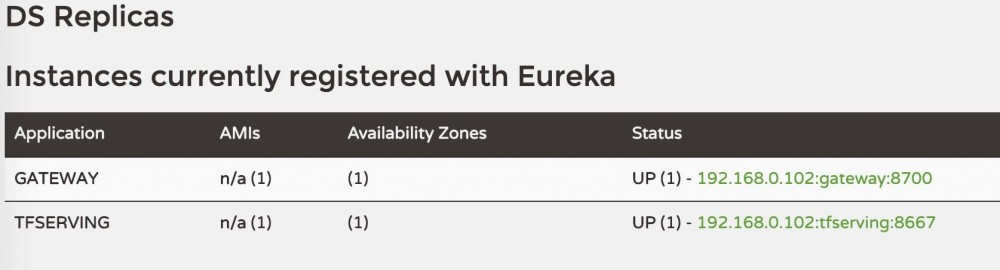
起来后可以看到注册上了Eureka:
Java访问
还是使用之前的客户端,加上请求TF-Serving接口
添加一个Request的结构体PredictRequestJson:
package com.example.callpython;

import java.io.Serializable;
import java.util.List;

public class PredictRequestJson<T> implements Serializable {
    private List<T> instances;
    private String signature_name;

    public List<T> getInstances() {
        return instances;
    }

    public void setInstances(List<T> instances) {
        this.instances = instances;
    }

    public String getSignature_name() {
        return signature_name;
    }

    public void setSignature_name(String signature_name) {
        this.signature_name = signature_name;
    }
}
添加一个Feign接口,使用刚才定义的Request:
package com.example.callpython;

import org.springframework.cloud.openfeign.FeignClient;
import org.springframework.validation.annotation.Validated;
import org.springframework.web.bind.annotation.RequestBody;
import org.springframework.web.bind.annotation.RequestMapping;
import org.springframework.web.bind.annotation.RequestMethod;

@FeignClient(name = "tfserving")
public interface TFServingFeign {

    @RequestMapping(value = "/v1/models/half_plus_two:predict", method = RequestMethod.POST)
    String getPredictResult(@Validated @RequestBody PredictRequestJson requestJson) throws Exception;
}
添加一个Controller函数,伪造数据调用Feign:
@RequestMapping("tfserving")
	public String requestTFServing() {
		try {
			PredictRequestJson requestJson = new PredictRequestJson();
			List<Double> integerList = new ArrayList<>();
        	integerList.add(1.0);
        	integerList.add(2.0);
        	integerList.add(5.1);
        	requestJson.setInstances(integerList);
        	requestJson.setSignature_name("serving_default");
			return tfServingFeign.getPredictResult(requestJson);
		} catch (Exception e) {
			System.out.println(e.getMessage());
		}
		return "exception or timeout";
	}
起服务后请求: http://localhost:8700/tfserving 返回
{
  predictions: [
    2.5,
    3,
    4.55
  ]
}
正文到此结束
- 本文标签: Feign 代码 java schema python Spring Boot UI JVM value 测试 lib ORM tar springcloud Google spring dependencies ACE pom id 配置 ArrayList XML 编译 client constant js Hystrix API tag REST http maven 服务端 map 注册中心 json web build Service https 模型 IDE junit Eureka 端口 core IO cat Netflix App apache example message ip springboot 数据 zab list 源码 src plugin description
- 版权声明: 本文为互联网转载文章,出处已在文章中说明(部分除外)。如果侵权,请联系本站长删除,谢谢。
- 本文海报: 生成海报一 生成海报二
热门推荐








相关文章



Loading...
![[HBLOG]公众号](https://www.liuhaihua.cn/img/qrcode_gzh.jpg)

