ASP.NET 5系列教程(七)完结篇-解读代码
在本文中,我们将一起查看TodoController 类代码。
[Route]属性定义了Controller的URL 模板:
[Route("api/[controller]")] 所有符合该模板类型的HTTP 请求都会被路由到该controller。在本例中, 路由的命名规范为对应Controller 的前缀,对于TodoController 类,路由模板为 “api/todo”。
HTTP 方法
[HttpGet]、 [HttpPost] 和 [HttpDelete] 属性定义为 controller 动作对应的HTTP 方法 (另外也有 [HttpPut] 和 [HttpPatch] 属性,在本示例中没有使用。)
[HttpGet]
public IEnumerable<TodoItem> GetAll() {} [HttpGet("{id:int}", Name = "GetByIdRoute")] public IActionResult GetById (int id) {} [HttpPost]
public void CreateTodoItem([FromBody] TodoItem item) {} [HttpDelete("{id:int}")] public IActionResult DeleteItem(int id) {} GetById 和DeleteItem 方法中的参数可以增加路由的传递信息。所以,路由模板更加完善的写法为“api/[controller]/{id:int}”。
在 “{id:int}” 中,id是变量,而 “:int” 代表参数为整型。以下为URLs实例:
http://localhost/api/todo/1
http://localhost/api/todo/42
不能写为:
http://localhost/api/todo/abc
注意 GetById 和 DeleteItem 方法同样拥有命名为id的参数。framework 会自动传递实参值到Controller中。例如,如果URL为 http://localhost/api/todo/42,id的 值则为42,这个过程为参数绑定。
CreateTodoItem 方法代表了另一个参数绑定:
[HttpPost]
public void CreateTodoItem([FromBody] TodoItem item) {} [FromBody]属性指定framework 从Request中反序列化TodoItem 参数。
以下是request和controller 动作的对应列表:
| Request | Controller Action |
| GET /api/todo | GetAll |
| POST /api/todo | CreateTodoItem |
| GET /api/todo/1 | GetById |
| DELETE /api/todo/1 | DeleteItem |
| GET /api/todo/abc | none – returns 404 |
| PUT /api/todo | none – returns 404 |
最后两个例子由于其他用途返回404 错误。例如 'GET /api/todo/abc', 'abc' 实参是GetById 方法中要求的整型数据类型。
Action 返回值
TodoController 类展示了多种 controller action的返回值方法。
GetAll 方法返回了一个CLR 对象。
[HttpGet]
public IEnumerable<TodoItem> GetAll() { return _items; }
返回对象的序列化信息被存储到Response消息中。默认格式为JSON,客户端同样可以接收XML数据格式:
GET http://localhost:5000/api/todo HTTP/1.1 User-Agent: Fiddler
Host: localhost:5000
Accept: application/xml
Response:
HTTP/1.1 200 OK
Content-Type: application/xml;charset=utf-8
Server: Microsoft-HTTPAPI/2.0
Date: Thu, 30 Oct 2014 22:40:10 GMT Content-Length: 228
<ArrayOfTodoItem xmlns:i="http://www.w3.org/2001/XMLSchema-instance" xmlns="http://schemas.datacontract.org/2004/07/TodoApi.Models"><TodoItem><Id>1</Id><IsDone>false</IsDone><Title>First Item</Title></TodoItem></ArrayOfTodoItem>
GetById 方法返回了一个IActionResult 接口:
[HttpGet("{id:int}", Name = "GetByIdRoute")] public IActionResult GetById (int id) { var item = _items.FirstOrDefault(x => x.Id == id);
if (item == null) { return HttpNotFound(); }
return new ObjectResult(item);
}
如果有URL中对应的id,则这个方法会返回ObjectResult 。返回 ObjectResult 和返回CLR 模型相同。而方法中规定返回类型为IActionResult。因此,该方法可以返回不同的类型。
如果没有对应ID,则返回HttpNotFound,页面会抛出404 错误。
最后, CreateTodoItem 方法展示如何直接在方法中设置返回值:
[HttpPost]
public void CreateTodoItem([FromBody] TodoItem item) { // (some code not shown here) Context.Response.StatusCode = 201;
Context.Response.Headers["Location"] = url; }
这种方法的缺陷是很难进行单元测试。(关于测试相关讨论,可以参考Unit Testing Controllers in ASP.NET Web API)。
依赖注入
MVC 6 内置了依赖注入功能。下面,让我们创建一个包含ToDo列表的repository 类。
首先,为repository定义一个接口:
using System.Collections.Generic; namespace TodoApi.Models { public interface ITodoRepository
{ IEnumerable<TodoItem> AllItems { get; } void Add(TodoItem item);
TodoItem GetById(int id);
bool TryDelete(int id);
}
}
之后定义具体实现方法。
using System; using System.Collections.Generic; using System.Linq; namespace TodoApi.Models { public class TodoRepository : ITodoRepository
{ readonly List<TodoItem> _items = new List<TodoItem>();
public IEnumerable<TodoItem> AllItems { get { return _items; }
}
public TodoItem GetById(int id) { return _items.FirstOrDefault(x => x.Id == id); }
public void Add(TodoItem item) { item.Id = 1 + _items.Max(x => (int?)x.Id) ?? 0;
_items.Add(item);
}
public bool TryDelete(int id) { var item = GetById(id);
if (item == null) { return false;
}
_items.Remove(item);
return true;
}
}
}
使用构造函数注入repository 到 controller:
[Route("api/[controller]")] public class TodoController : Controller
{ // Remove this code:
//static readonly List<TodoItem> _items = new List<TodoItem>()
//{ // new TodoItem { Id = 1, Title = "First Item" }
//};
// Add this code:
private readonly ITodoRepository _repository;
public TodoController(ITodoRepository repository) { _repository = repository;
}
然后更新controller 方法到repository:
[HttpGet]
public IEnumerable<TodoItem> GetAll() { return _repository.AllItems; }
[HttpGet("{id:int}", Name = "GetByIdRoute")] public IActionResult GetById(int id) { var item = _repository.GetById(id);
if (item == null) { return HttpNotFound(); }
return new ObjectResult(item);
}
[HttpPost]
public void CreateTodoItem([FromBody] TodoItem item) { if (!ModelState.IsValid) { Context.Response.StatusCode = 400;
}
else { _repository.Add(item);
string url = Url.RouteUrl("GetByIdRoute", new { id = item.Id }, Request.Scheme, Request.Host.ToUriComponent());
Context.Response.StatusCode = 201;
Context.Response.Headers["Location"] = url; }
}
[HttpDelete("{id}")] public IActionResult DeleteItem(int id) { if (_repository.TryDelete(id)) { return new HttpStatusCodeResult(204); // 201 No Content
}
else { return HttpNotFound(); }
}
我们需要注册repository到依赖注入系统才能使其启作用。在Startup 类中,添加以下代码:
public void ConfigureServices(IServiceCollection services) { services.AddMvc();
// New code services.AddSingleton<ITodoRepository, TodoRepository>();
}
应用运行时, 一旦controller被创建,framework 自动注入TodoRepository 到controller中,它将作用于整个应用的生命周期。
在IIS外独立部署应用
默认情况下,当你点击F5,应用会在IIS Express中运行。你可以在工具栏中看到IIS Express 图标。
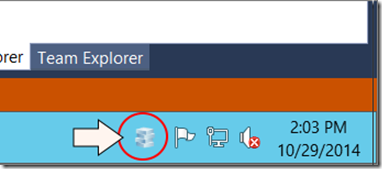
ASP.NET 5.0 可以部署到不同的服务器中,在本节中,我们将使用可运行在IIS外的WebListener。
注意:将应用部署在IIS中仍有诸多的优势,例如安全性、进度管理等。
在project.json 文件,添加Microsoft.AspNet.Server.WebListener 包:
"dependencies": { "Microsoft.AspNet.Server.IIS": "1.0.0-beta1",
"Microsoft.AspNet.Diagnostics": "1.0.0-beta1",
"Microsoft.AspNet.Mvc": "6.0.0-beta1",
// New: "Microsoft.AspNet.Server.WebListener": "6.0.0-beta1"
},
接下来添加以下选项到project.json。
{ // Other sections not shown "commands": { "web ": "Microsoft.AspNet.Hosting --server Microsoft.AspNet.Server.WebListener --server.urls http://localhost:5000"
}
}
“commands” 中包含了可以传递给K 运行时的预定义指令列表。在这个例子中, “web” 是指令名称,它可以是任意实际指令名称值。
Microsoft.AspNet.Hosting 程序集用于部署ASP.NET 5.0 应用。
· --server 标记用于声明服务器,在这个例子中为WebListener。
· --server.urls 标记提供需要监听的URL。
保存project.json 文件。在Solution Explorer中,右键点击工程选择 Properties 。在 Properties 栏,点击 Debug 。在 Debug target 下,更改 “IIS Express” 为 “web”。
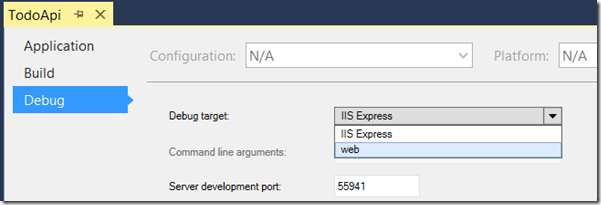
点击F5运行App。Visual Studio 这时会运行启动WebListener 的控制台应用。
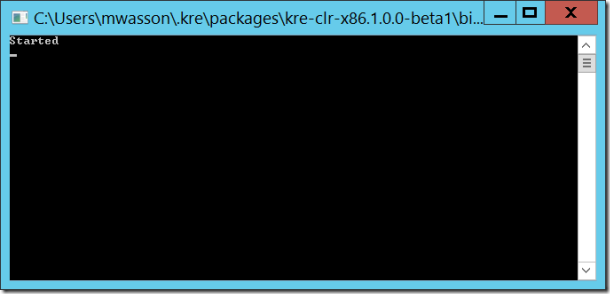
打开浏览器,输入 http://localhost:5000 。你可以看到欢迎界面。
如果需要使用IIS,在上一步骤中更改Debug Target 为 “IIS Express”即可。
这篇文章为本系列文章的最后一篇,感谢大家的关注。
原文链接: http://www.asp.net/vnext/overview/aspnet-vnext/create-a-web-api-with-mvc-6
目录:
正文到此结束
热门推荐









相关文章

近期评论
-
出现OpenClaw "device signature expired"。the Gateway rejects if Math.abs(Date.now() - signedAt) > 10 * 60 * 1000 (10 minutes)
-
-
想购买您这个站,我的联系方式QQ741756694微信同步 能卖联系
-
-
-
博主的博客用的什么技术栈,内容都是干货,赞
-
-
https://www.liuhaihua.cn/archives/40657.html 这篇博客中的图片打不开了
-
不会英语啊。
-
Loading...
![[HBLOG]公众号](https://www.liuhaihua.cn/img/qrcode_gzh.jpg)

