angular 自定义form表单input range validate
angular的form体系,为我们做表单验证提供了很大的便利.
- 它会为我们的表单元素添加标识不同状态的class,我们可以set对应样式控制元素表现
- 根据form的$valid, $toched等状态属性控制元素行为,譬如对submit button添加上(ng-disabled=”form.$invalid”)属性,输入不合法时禁止提交
- 在controller里,通过form的$setValidity, $comitViewVaue 等方法,进行一系列的form交互控制。
- 再比如,自定义form内元素的验证行为,如自定义一个numRangeValidate的directive,绑到form里的input上去,验证输入范围。
源码片段分析
angular 源码中,ngModelDirective 会在preLink里找到它从属的form,然后调用form的addControl方法把自己注册进去。
根据form的addControl方法,我们可以通过 form.元素的name 访问到元素的一些信息,可以自己打印出来看看。Form在 $setPristine 或其他操作时,会依次调用自己controls里的那些ctrl上的相应方法。
比如 form.$commitViewValue 依次调用了 control.$commitViewValue 方法,而ngModelController里的 $commitViewValue 方法会调用 $$parseAndValidate ,这个方法里循环调用了我们稍后会用到的 parsers 里的所有验证。
代码片段如下
var ngModelDirective = ['$rootScope', function($rootScope) {
  return {
    restrict: 'A',
    require: ['ngModel', '^?form', '^?ngModelOptions'],
    controller: NgModelController,
    // Prelink needs to run before any input directive
    // so that we can set the NgModelOptions in NgModelController
    // before anyone else uses it.
    priority: 1,
    compile: function ngModelCompile(element) {
      // Setup initial state of the control
      element.addClass(PRISTINE_CLASS).addClass(UNTOUCHED_CLASS).addClass(VALID_CLASS);

      return {
        pre: function ngModelPreLink(scope, element, attr, ctrls) {
          var modelCtrl = ctrls[0],
              formCtrl = ctrls[1] || modelCtrl.$$parentForm;

          modelCtrl.$$setOptions(ctrls[2] && ctrls[2].$options);

          // notify others, especially parent forms
          formCtrl.$addControl(modelCtrl);

          attr.$observe('name', function(newValue) {
            if (modelCtrl.$name !== newValue) {
              modelCtrl.$$parentForm.$$renameControl(modelCtrl, newValue);
            }
          });

          scope.$on('$destroy', function() {
            modelCtrl.$$parentForm.$removeControl(modelCtrl);
          });
        },
.....

form.$addControl = function(control) {
   // Breaking change - before, inputs whose name was "hasOwnProperty" were quietly ignored
   // and not added to the scope.  Now we throw an error.
   assertNotHasOwnProperty(control.$name, 'input');
   controls.push(control);

   if (control.$name) {
     form[control.$name] = control;
   }

   control.$$parentForm = form;
 };

....

form.$commitViewValue = function() {
  forEach(controls, function(control) {
    control.$commitViewValue();
  });
};
自定义输入框数字范围验证控件
下面我们来写个小例子,设置买一组商品所需要的总预算,系统根据用户勾选的商品自动计算预算,当然用户也可以自己输入,但是输入值除了基本的数字验证外,还必须不低于已勾选商品价格总和,即需要动态的限制用户可输入的最小值。
首先,我们可以先写好一个NumRangeValidateDirective,用于验证输入值的范围。如下,它绑定了两个输入min, max, 同时require了ngModel。 ngModel的$parsers里的方法决定如何将Dom值,即用户输入的值,转换到ng-model所绑定的值,而$formatters里的方法决定如何将model值呈现到界面上 。
因为我们要验证用户输入,所以往ngModel的$parsers里添加一个自定义的方法。
首先通过正则验证一下输入格式,比如’009’, ‘rrr’,不允许这样的输入。
然后与scope上的min, max分别比较一下,如果不符合范围,则通过 ngModel.$setValidity('numRange', ...); 设置一个numRange类别的invalid信息。
function NumRangeValidateDirective() {
    return {
        require: 'ngModel',
        scope: {
            min: '=',
            max: '='
        },
        link: (scope, elem, attr, ngModel) => {
            //For DOM -> model validation
            ngModel.$parsers.push((value) => {
                let valid = ((/^-?(0|([1-9]/d*))$/).test(`${value}`));
                const res = _.toNumber(value);
                valid = _.isUndefined(scope.min) ? valid : (valid && (res >= scope.min));
                valid = _.isUndefined(scope.max) ? valid : (valid && (res <= scope.max));
                ngModel.$setValidity('numRange', valid);
                return valid ? res : undefined; // eslint-disable-line no-undefined
            });

            //For model -> DOM validation
            // ngModel.$formatters.unshift((value) => {
            //     // ngModel.$setValidity('budget', blacklist.indexOf(value) === -1);
            //     return value;
            // });
        }
    };
}
export default NumRangeValidateDirective;
往input上加上num-range-validate控件(angular自带一些验证,如ng-required,可以去 官网 查看)
form(name="ctrl.form")
   .input-wrapper
     input(name="budget", ng-model="ctrl.totalBudget", num-range-validate,  min="ctrl.sum")
     i.fa.fa-exclamation.error(ng-show="ctrl.form.budget.$invalid", title="您的预算不得低于已选物品总金额{{ctrl.sum}}")
可以通过 ctrl.form.budget.$error 拿到具体的错误信息。
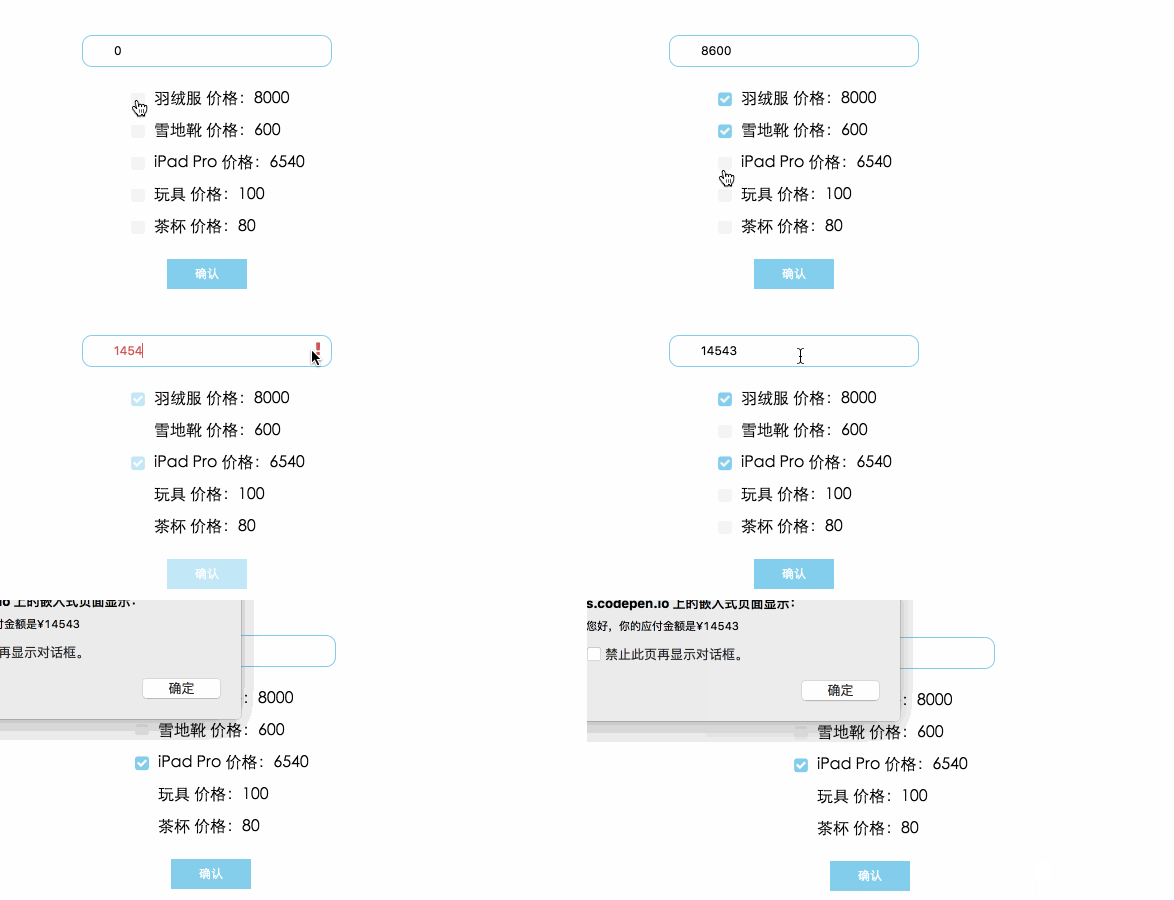 附上 codepen Example 地址
参考
- angular Formvalidate 运作原理
- angular compile pre post link
- angular compile controller link
正文到此结束
热门推荐









相关文章

近期评论
-
出现OpenClaw "device signature expired"。the Gateway rejects if Math.abs(Date.now() - signedAt) > 10 * 60 * 1000 (10 minutes)
-
-
想购买您这个站,我的联系方式QQ741756694微信同步 能卖联系
-
-
-
博主的博客用的什么技术栈,内容都是干货,赞
-
-
https://www.liuhaihua.cn/archives/40657.html 这篇博客中的图片打不开了
-
不会英语啊。
-
Loading...
![[HBLOG]公众号](https://www.liuhaihua.cn/img/qrcode_gzh.jpg)

