Mybatis原理之数据源和连接池
在Java工程项目中,我们常会用到 Mybatis 框架对数据库中的数据进行增删查改,其原理就是对 JDBC 做了一层封装,并优化数据源的连接。
我们先来回顾下 JDBC 操作数据库的过程。
JDBC 操作数据库
JDBC 操作数据库的时候需要指定 连接类型、加载驱动、建立连接、最终执行 SQL 语句,代码如下:
public static final String url = "jdbc:mysql://127.0.0.1/somedb";
    public static final String name = "com.mysql.jdbc.Driver";
    public static final String user = "root";
    public static final String password = "root";

    public Connection conn = null;
    public PreparedStatement pst = null;

    public DBHelper(String sql) {
        try {
              //指定连接类型
            Class.forName(name);
              //建立连接
            conn = DriverManager.getConnection(url, user, password);
              //准备执行语句
            pst = conn.prepareStatement(sql);
        } catch (Exception e) {
            e.printStackTrace();
        }
    }

    public void close() {
        try {
            this.conn.close();
            this.pst.close();
        } catch (SQLException e) {
            e.printStackTrace();
        }
    }
一个 SQL 的执行,如果使用 JDBC 进行处理,需要经过 加载驱动、建立连接、再执行 SQL 的一个过程,当下一个 SQL 到来的时候,还需要进行一次这个流程,这就造成不必要的性能损失,而且随着用户操作的逐渐增多,每次都和数据库建立连接对数据库本身来说也是一种压力。
为了减少这种不必要的消耗,可以对数据的操作进行拆分。在 Mybatis 中,数据库连接的建立和管理的部分叫做数据库连接池。
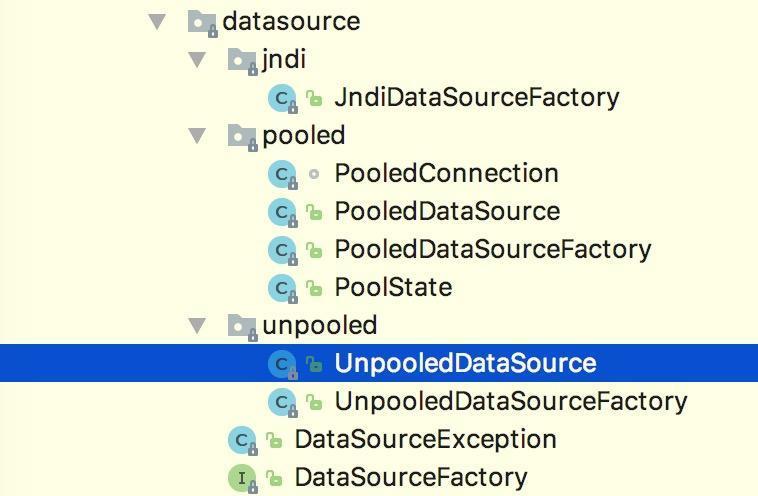
Mybatis 数据源 DateSource 的分类
- UNPOOLED 不使用连接池的数据源
- POOLED 使用连接池的数据源
- JNDI 使用JNDI实现的数据
-
UNPOOLED
UNPOOLED不使用连接池的数据源,当dateSource的type属性被配置成了UNPOOLED,MyBatis首先会实例化一个UnpooledDataSourceFactory工厂实例,然后通过.getDataSource()方法返回一个UnpooledDataSource实例对象引用,我们假定为dataSource。 使用
UnpooledDataSource的getConnection(),每调用一次就会产生一个新的Connection实例对象。UnPooledDataSource的getConnection()方法实现如下:
public class UnpooledDataSource implements DataSource {
    private ClassLoader driverClassLoader;
    private Properties driverProperties;
    private static Map<String, Driver> registeredDrivers = new ConcurrentHashMap();
    private String driver;
    private String url;
    private String username;
    private String password;
    private Boolean autoCommit;
    private Integer defaultTransactionIsolationLevel;

    public UnpooledDataSource() {
    }

    public UnpooledDataSource(String driver, String url, String username, String password){
        this.driver = driver;
        this.url = url;
        this.username = username;
        this.password = password;
    }

    public Connection getConnection() throws SQLException {
        return this.doGetConnection(this.username, this.password);
    }

    private Connection doGetConnection(String username, String password) throws SQLException {
        Properties props = new Properties();
        if(this.driverProperties != null) {
            props.putAll(this.driverProperties);
        }

        if(username != null) {
            props.setProperty("user", username);
        }

        if(password != null) {
            props.setProperty("password", password);
        }

        return this.doGetConnection(props);
    }

    private Connection doGetConnection(Properties properties) throws SQLException {
        this.initializeDriver();
        Connection connection = DriverManager.getConnection(this.url, properties);
        this.configureConnection(connection);
        return connection;
    }
}
如上代码所示, UnpooledDataSource 会做以下事情:
- 初始化驱动: 判断driver驱动是否已经加载到内存中,如果还没有加载,则会动态地加载
driver类,并实例化一个Driver对象,使用DriverManager.registerDriver()方法将其注册到内存中,以供后续使用。 - 创建Connection对象: 使用
DriverManager.getConnection()方法创建连接。 - 配置Connection对象: 设置是否自动提交
autoCommit和隔离级别isolationLevel。 - 返回Connection对象
从上述的代码中可以看到,我们每调用一次 getConnection() 方法,都会通过 DriverManager.getConnection() 返回新的 java.sql.Connection 实例,所以没有连接池。
-
POOLED数据源 连接池
PooledDataSource: 将 java.sql.Connection 对象包裹成 PooledConnection 对象放到了 PoolState 类型的容器中维护。 MyBatis 将连接池中的 PooledConnection 分为两种状态: 空闲状态(idle)和活动状态(active),这两种状态的 PooledConnection 对象分别被存储到 PoolState 容器内的 idleConnections 和 activeConnections 两个List集合中:
idleConnections: 空闲(idle)状态 PooledConnection 对象被放置到此集合中,表示当前闲置的没有被使用的 PooledConnection 集合,调用 PooledDataSource 的 getConnection() 方法时,会优先从此集合中取 PooledConnection 对象。当用完一个java.sql.Connection对象时, MyBatis 会将其包裹成 PooledConnection 对象放到此集合中。
activeConnections: 活动(active)状态的 PooledConnection 对象被放置到名为 activeConnections 的 ArrayList 中,表示当前正在被使用的 PooledConnection 集合,调用 PooledDataSource 的 getConnection() 方法时,会优先从 idleConnections 集合中取 PooledConnection 对象,如果没有,则看此集合是否已满,如果未满, PooledDataSource 会创建出一个 PooledConnection ,添加到此集合中,并返回
现在让我们看一下 popConnection() 方法到底做了什么:
- 先看是否有空闲(idle)状态下的
PooledConnection对象,如果有,就直接返回一个可用的PooledConnection对象;否则进行第2步。 - 查看活动状态的
PooledConnection池activeConnections是否已满;如果没有满,则创建一个新的PooledConnection对象,然后放到activeConnections池中,然后返回此PooledConnection对象;否则进行第三步; - 看最先进入
activeConnections池中的PooledConnection对象是否已经过期:如果已经过期,从activeConnections池中移除此对象,然后创建一个新的PooledConnection对象,添加到activeConnections中,然后将此对象返回;否则进行第4步。 - 线程等待,循环2步
/*
 * 传递一个用户名和密码,从连接池中返回可用的PooledConnection
 */
private PooledConnection popConnection(String username, String password) throws SQLException
{
    boolean countedWait = false;
    PooledConnection conn = null;
    long t = System.currentTimeMillis();
    int localBadConnectionCount = 0;

    while (conn == null)
    {
        synchronized (state)
        {
            if (state.idleConnections.size() > 0)
            {
                // 连接池中有空闲连接,取出第一个
                conn = state.idleConnections.remove(0);
                if (log.isDebugEnabled())
                {
                    log.debug("Checked out connection " + conn.getRealHashCode() + " from pool.");
                }
            }
            else
            {
                // 连接池中没有空闲连接,则取当前正在使用的连接数小于最大限定值,
                if (state.activeConnections.size() < poolMaximumActiveConnections)
                {
                    // 创建一个新的connection对象
                    conn = new PooledConnection(dataSource.getConnection(), this);
                    @SuppressWarnings("unused")
                    //used in logging, if enabled
                    Connection realConn = conn.getRealConnection();
                    if (log.isDebugEnabled())
                    {
                        log.debug("Created connection " + conn.getRealHashCode() + ".");
                    }
                }
                else
                {
                    // Cannot create new connection 当活动连接池已满,不能创建时,取出活动连接池的第一个,即最先进入连接池的PooledConnection对象
                    // 计算它的校验时间,如果校验时间大于连接池规定的最大校验时间,则认为它已经过期了,利用这个PoolConnection内部的realConnection重新生成一个PooledConnection
                    //
                    PooledConnection oldestActiveConnection = state.activeConnections.get(0);
                    long longestCheckoutTime = oldestActiveConnection.getCheckoutTime();
                    if (longestCheckoutTime > poolMaximumCheckoutTime)
                    {
                        // Can claim overdue connection
                        state.claimedOverdueConnectionCount++;
                        state.accumulatedCheckoutTimeOfOverdueConnections += longestCheckoutTime;
                        state.accumulatedCheckoutTime += longestCheckoutTime;
                        state.activeConnections.remove(oldestActiveConnection);
                        if (!oldestActiveConnection.getRealConnection().getAutoCommit())
                        {
                            oldestActiveConnection.getRealConnection().rollback();
                        }
                        conn = new PooledConnection(oldestActiveConnection.getRealConnection(), this);
                        oldestActiveConnection.invalidate();
                        if (log.isDebugEnabled())
                        {
                            log.debug("Claimed overdue connection " + conn.getRealHashCode() + ".");
                        }
                    }
                    else
                    {

                        //如果不能释放,则必须等待有
                        // Must wait
                        try
                        {
                            if (!countedWait)
                            {
                                state.hadToWaitCount++;
                                countedWait = true;
                            }
                            if (log.isDebugEnabled())
                            {
                                log.debug("Waiting as long as " + poolTimeToWait + " milliseconds for connection.");
                            }
                            long wt = System.currentTimeMillis();
                            state.wait(poolTimeToWait);
                            state.accumulatedWaitTime += System.currentTimeMillis() - wt;
                        }
                        catch (InterruptedException e)
                        {
                            break;
                        }
                    }
                }
            }

            //如果获取PooledConnection成功,则更新其信息

            if (conn != null)
            {
                if (conn.isValid())
                {
                    if (!conn.getRealConnection().getAutoCommit())
                    {
                        conn.getRealConnection().rollback();
                    }
                    conn.setConnectionTypeCode(assembleConnectionTypeCode(dataSource.getUrl(), username, password));
                    conn.setCheckoutTimestamp(System.currentTimeMillis());
                    conn.setLastUsedTimestamp(System.currentTimeMillis());
                    state.activeConnections.add(conn);
                    state.requestCount++;
                    state.accumulatedRequestTime += System.currentTimeMillis() - t;
                }
                else
                {
                    if (log.isDebugEnabled())
                    {
                        log.debug("A bad connection (" + conn.getRealHashCode() + ") was returned from the pool, getting another connection.");
                    }
                    state.badConnectionCount++;
                    localBadConnectionCount++;
                    conn = null;
                    if (localBadConnectionCount > (poolMaximumIdleConnections + 3))
                    {
                        if (log.isDebugEnabled())
                        {
                            log.debug("PooledDataSource: Could not get a good connection to the database.");
                        }
                        throw new SQLException("PooledDataSource: Could not get a good connection to the database.");
                    }
                }
            }
        }

    }

    if (conn == null)
    {
        if (log.isDebugEnabled())
        {
            log.debug("PooledDataSource: Unknown severe error condition.  The connection pool returned a null connection.");
        }
        throw new SQLException("PooledDataSource: Unknown severe error condition.  The connection pool returned a null connection.");
    }

    return conn;
}
java.sql.Connection 对象的回收
当我们的程序中使用完 Connection 对象时,如果不使用数据库连接池,我们一般会调用 connection.close() 方法,关闭 connection 连接,释放资源
调用过 close() 方法的 Connection 对象所持有的资源会被全部释放掉, Connection 对象也就不能再使用。那么,如果我们使用了连接池,我们在用完了 Connection 对象时,需要将它放在连接池中,该怎样做呢?
可能大家第一个在脑海里闪现出来的想法就是:我在应该调用 con.close() 方法的时候,不调用 close() 方法,将其换成将 Connection 对象放到连接池容器中的代码!
怎样实现 Connection 对象调用了 close() 方法,而实际是将其添加到连接池中
这是要使用代理模式,为真正的 Connection 对象创建一个代理对象,代理对象所有的方法都是调用相应的真正 Connection 对象的方法实现。当代理对象执行 close() 方法时,要特殊处理,不调用真正 Connection 对象的 close() 方法,而是将 Connection 对象添加到连接池中。
MyBatis 的 PooledDataSource 的 PoolState 内部维护的对象是 PooledConnection 类型的对象,而 PooledConnection 则是对真正的数据库连接 java.sql.Connection 实例对象的包裹器。
PooledConnection 对象内持有一个真正的数据库连接 java.sql.Connection 实例对象和一个 java.sql.Connection 的代理:
其源码如下:
class PooledConnection implements InvocationHandler {
    private static final String CLOSE = "close";
    private static final Class<?>[] IFACES = new Class[]{Connection.class};
    private int hashCode = 0;
    private PooledDataSource dataSource;
    private Connection realConnection;
    private Connection proxyConnection;
    private long checkoutTimestamp;
    private long createdTimestamp;
    private long lastUsedTimestamp;
    private int connectionTypeCode;
    private boolean valid;

    public PooledConnection(Connection connection, PooledDataSource dataSource) {
        this.hashCode = connection.hashCode();
        this.realConnection = connection;
        this.dataSource = dataSource;
        this.createdTimestamp = System.currentTimeMillis();
        this.lastUsedTimestamp = System.currentTimeMillis();
        this.valid = true;
        this.proxyConnection = (Connection)Proxy.newProxyInstance(Connection.class.getClassLoader(), IFACES, this);
    }

    public Object invoke(Object proxy, Method method, Object[] args) throws Throwable {
        String methodName = method.getName();
          //当close时候,会回收 connection , 不会真正的close
        if("close".hashCode() == methodName.hashCode() && "close".equals(methodName)) {
            this.dataSource.pushConnection(this);
            return null;
        } else {
            try {
                if(!Object.class.equals(method.getDeclaringClass())) {
                    this.checkConnection();
                }

                return method.invoke(this.realConnection, args);
            } catch (Throwable var6) {
                throw ExceptionUtil.unwrapThrowable(var6);
            }
        }
    }
}

正文到此结束
- 本文标签: Connection db MyBatis原理 连接池 配置 list java ACE 线程 HashMap Proxy 管理 dataSource tab Action synchronized map 实例 mysql Word 数据库 bug newProxyInstance NSA final 源码 Property equals sql CTO http id Statement 数据 mybatis ssl Logging ArrayList cat 时间 src https IO JDBC UI REST root autocommit 压力 ConcurrentHashMap 代码
- 版权声明: 本文为互联网转载文章,出处已在文章中说明(部分除外)。如果侵权,请联系本站长删除,谢谢。
- 本文海报: 生成海报一 生成海报二
热门推荐









相关文章

近期评论
-
出现OpenClaw "device signature expired"。the Gateway rejects if Math.abs(Date.now() - signedAt) > 10 * 60 * 1000 (10 minutes)
-
-
想购买您这个站,我的联系方式QQ741756694微信同步 能卖联系
-
-
-
博主的博客用的什么技术栈,内容都是干货,赞
-
-
https://www.liuhaihua.cn/archives/40657.html 这篇博客中的图片打不开了
-
不会英语啊。
-
Loading...
![[HBLOG]公众号](https://www.liuhaihua.cn/img/qrcode_gzh.jpg)

