大数据的“helloworld”,你还记得怎么写吗?
java入门hello world
大数据入门--wordcount
因为工作的关系,频繁的重复被wordcount配置的恐惧,尤其是在scala横飞的今天,长久的不再使用有的时候真的记不住啊,从网上找各种相应的代码,五味杂陈,所以在这里将简单的wordcount的代码整理出来供大家使用,也供自己参考
首先就是我们的Mapper层
import org.apache.hadoop.io.IntWritable;

import org.apache.hadoop.io.LongWritable;

import org.apache.hadoop.io.Text;

import org.apache.hadoop.mapreduce.Mapper;

import java.io.IOException;

public class WcMapper extends Mapper<LongWritable, Text, Text, IntWritable> {

protected void map(LongWritable key, Text value, Context context) throws IOException, InterruptedException {

//*/* map阶段的业务逻辑就写在自定义的map()方法中

/* maptask会对每一行输入数据调用一次我们自定义的map()方法

/*/

// 1 将maptask传给我们的文本内容先转换成String

String line = value.toString();

// 2 根据空格将这一行切分成单词

String/[/] words = line.split(" ");

// 3 将单词输出为<单词,1>

for(String word:words){

// 将单词作为key,将次数1作为value,以便于后续的数据分发,可以根据单词分发,以便于相同单词会到相同的reducetask中

context.write(new Text(word), new IntWritable(1));

}

}

}
接下来是reduce层
import org.apache.hadoop.io.IntWritable;

import org.apache.hadoop.io.Text;

import org.apache.hadoop.mapreduce.Reducer;

import java.io.IOException;

public class WcReduce extends Reducer<Text, IntWritable, Text, IntWritable> {

//*/*

/* key,是一组相同单词kv对的key

/*/

@Override

protected void reduce(Text key, Iterable<IntWritable> values, Context context) throws IOException, InterruptedException {

int count = 0;

// 1 汇总各个key的个数

for (IntWritable value : values) {

count += value.get();

}

// 2输出该key的总次数

context.write(key, new IntWritable(count));

}

}
最后是实现,但是在实现这里,主要分为三类
1、本地测试
package com.msb;

import org.apache.hadoop.conf.Configuration;

import org.apache.hadoop.fs.Path;

import org.apache.hadoop.io.IntWritable;

import org.apache.hadoop.io.Text;

import org.apache.hadoop.mapreduce.Job;

import org.apache.hadoop.mapreduce.lib.input.FileInputFormat;

import org.apache.hadoop.mapreduce.lib.output.FileOutputFormat;

public class WcMain {

public static void main(String/[/] args) throws Exception {

// 1 获取配置信息,或者job对象实例

Configuration configuration = new Configuration();

//设置本地运行模式

configuration.set("fs.defaultFS","file:///");

Job job = Job.getInstance(configuration);

// 6 指定本程序的jar包所在的本地路径

// job.setJar("/home/admin/wc.jar");

job.setJarByClass(WcMain.class);

// 2 指定本业务job要使用的mapper/Reducer业务类

job.setMapperClass(WcMapper.class);

job.setReducerClass(WcReduce.class);

// 3 指定mapper输出数据的kv类型

job.setMapOutputKeyClass(Text.class);

job.setMapOutputValueClass(IntWritable.class);

// 4 指定最终输出的数据的kv类型

job.setOutputKeyClass(Text.class);

job.setOutputValueClass(IntWritable.class);

// 5 指定job的输入原始文件所在目录

FileInputFormat.setInputPaths(job, new Path(args/[0/]));

FileOutputFormat.setOutputPath(job, new Path(args/[1/]));

// 7 将job中配置的相关参数,以及job所用的java类所在的jar包, 提交给yarn去运行

// job.submit();

boolean result = job.waitForCompletion(true);

System.exit(result?0:1);

}

}
注意,output路径不能有对应的文件夹
2、提交集群运行
package com.msb;

import org.apache.hadoop.conf.Configuration;

import org.apache.hadoop.fs.Path;

import org.apache.hadoop.io.IntWritable;

import org.apache.hadoop.io.Text;

import org.apache.hadoop.mapreduce.Job;

import org.apache.hadoop.mapreduce.lib.input.FileInputFormat;

import org.apache.hadoop.mapreduce.lib.output.FileOutputFormat;

public class WcMainCluser {

public static void main(String/[/] args) throws Exception {

// 1 获取配置信息,或者job对象实例

Configuration configuration = new Configuration();

//*本地提交集群运行

/* /*/

// configuration.set("mapreduce.app-submission.cross-platform", "true");

configuration.set("fs.defaultFS","hdfs://node01:9000");

Job job = Job.getInstance(configuration);

// 6 指定本程序的jar包所在的本地路径

// job.setJar("/home/admin/wc.jar");

job.setJarByClass(WcMainCluser.class);

// 2 指定本业务job要使用的mapper/Reducer业务类

job.setMapperClass(WcMapper.class);

job.setReducerClass(WcReduce.class);

// 3 指定mapper输出数据的kv类型

job.setMapOutputKeyClass(Text.class);

job.setMapOutputValueClass(IntWritable.class);

// 4 指定最终输出的数据的kv类型

job.setOutputKeyClass(Text.class);

job.setOutputValueClass(IntWritable.class);

// 5 指定job的输入原始文件所在目录

FileInputFormat.setInputPaths(job, new Path( "hdfs://node01:9000/input/text"));

FileOutputFormat.setOutputPath(job, new Path("hdfs://node01:9000/output"));

// 7 将job中配置的相关参数,以及job所用的java类所在的jar包, 提交给yarn去运行

job.submit();

boolean result = job.waitForCompletion(true);

System.exit(result?0:1);

}

}
3、提交yarn运行
package com.msb;

import org.apache.hadoop.conf.Configuration;

import org.apache.hadoop.fs.Path;

import org.apache.hadoop.io.IntWritable;

import org.apache.hadoop.io.Text;

import org.apache.hadoop.mapreduce.Job;

import org.apache.hadoop.mapreduce.lib.input.FileInputFormat;

import org.apache.hadoop.mapreduce.lib.output.FileOutputFormat;

public class WcMainYarn {

public static void main(String/[/] args) throws Exception {

// 1 获取配置信息,或者job对象实例

Configuration configuration = new Configuration();

//*本地提交集群运行

/* /*/

configuration.set("yarn.resourcemanager.address", "192.168.152.123:8050");

configuration.set("mapreduce.framework.name", "yarn");

configuration.set("mapreduce.app-submission.cross-platform", "true");

configuration.set("fs.defaultFS", "hdfs://node01:9000");

Job job = Job.getInstance(configuration);

// 6 指定本程序的jar包所在的本地路径

job.setJar("/test/hadoop/WordCount-1.0-SNAPSHOT.jar");

//job.setJar("E:////Java////WordCount////target////WordCount-1.0-SNAPSHOT.jar");

job.setJarByClass(WcMainYarn.class);

// 2 指定本业务job要使用的mapper/Reducer业务类

job.setMapperClass(WcMapper.class);

job.setReducerClass(WcReduce.class);

// 3 指定mapper输出数据的kv类型

job.setMapOutputKeyClass(Text.class);

job.setMapOutputValueClass(IntWritable.class);

// 4 指定最终输出的数据的kv类型

job.setOutputKeyClass(Text.class);

job.setOutputValueClass(IntWritable.class);

// 5 指定job的输入原始文件所在目录

FileInputFormat.setInputPaths(job, new Path( "hdfs://node01:9000/input/text"));

FileOutputFormat.setOutputPath(job, new Path("hdfs://node01:9000/output"));

// 7 将job中配置的相关参数,以及job所用的java类所在的jar包, 提交给yarn去运行

job.submit();

boolean result = job.waitForCompletion(true);

System.exit(result?0:1);

}

}
4、将代码打包提交到集群中运行
将idea中创建的项目进行打包,并上传到hadoop集群中
打包:
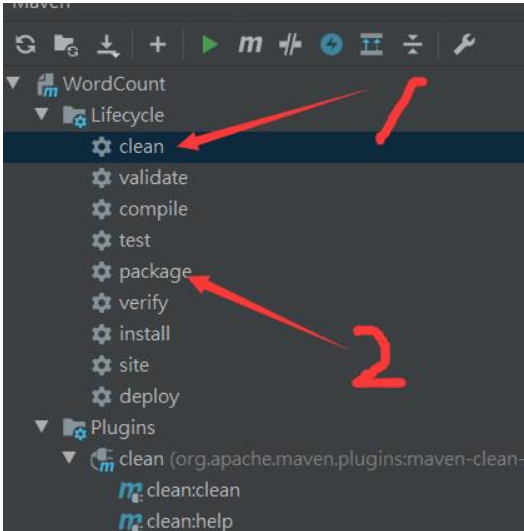
上传到集群之后,通过命令进行运行
hadoop jar jar包名 com.msb.WordCount(需要执行文件的路径名)
注意:
在这个地方有很多人本地进行测试或者连接集群的时候没有办法进行,是因为没有进行相应的修改,需要在本地windows下进行hadoop的配置
正文到此结束
热门推荐









相关文章

近期评论
-
出现OpenClaw "device signature expired"。the Gateway rejects if Math.abs(Date.now() - signedAt) > 10 * 60 * 1000 (10 minutes)
-
-
想购买您这个站,我的联系方式QQ741756694微信同步 能卖联系
-
-
-
博主的博客用的什么技术栈,内容都是干货,赞
-
-
https://www.liuhaihua.cn/archives/40657.html 这篇博客中的图片打不开了
-
不会英语啊。
-
Loading...
![[HBLOG]公众号](https://www.liuhaihua.cn/img/qrcode_gzh.jpg)

