Mybatis-Plus---快速入门
简介:
MyBatis-Plus (简称 MP)是一个 MyBatis 的增强工具,在 MyBatis 的基础上只做增强不做改变,为简化开发、提高效率而生。
1.特性:
- 无侵入 :只做增强不做改变,引入它不会对现有工程产生影响,如丝般顺滑
- 损耗小 :启动即会自动注入基本 CURD,性能基本无损耗,直接面向对象操作
- 强大的 CRUD 操作 :内置通用 Mapper、通用 Service,仅仅通过少量配置即可实现单表大部分 CRUD 操作,更有强大的条件构造器,满足各类使用需求
- 支持 Lambda 形式调用 :通过 Lambda 表达式,方便的编写各类查询条件,无需再担心字段写错
- 支持主键自动生成 :支持多达 4 种主键策略(内含分布式唯一 ID 生成器 - Sequence),可自由配置,完美解决主键问题
- 支持 ActiveRecord 模式 :支持 ActiveRecord 形式调用,实体类只需继承 Model 类即可进行强大的 CRUD 操作
- 支持自定义全局通用操作 :支持全局通用方法注入( Write once, use anywhere )
- 内置代码生成器 :采用代码或者 Maven 插件可快速生成 Mapper 、 Model 、 Service 、 Controller 层代码,支持模板引擎,更有超多自定义配置等您来使用
- 内置分页插件 :基于 MyBatis 物理分页,开发者无需关心具体操作,配置好插件之后,写分页等同于普通 List 查询
- 分页插件支持多种数据库 :支持 MySQL、MariaDB、Oracle、DB2、H2、HSQL、SQLite、Postgre、SQLServer 等多种数据库
- 内置性能分析插件 :可输出 Sql 语句以及其执行时间,建议开发测试时启用该功能,能快速揪出慢查询
- 内置全局拦截插件 :提供全表 delete 、 update 操作智能分析阻断,也可自定义拦截规则,预防误操作
2.支持数据库:
mysql 、 mariadb 、 oracle 、 db2 、 h2 、 hsql 、 sqlite 、 postgresql 、 sqlserver
3.框架结构
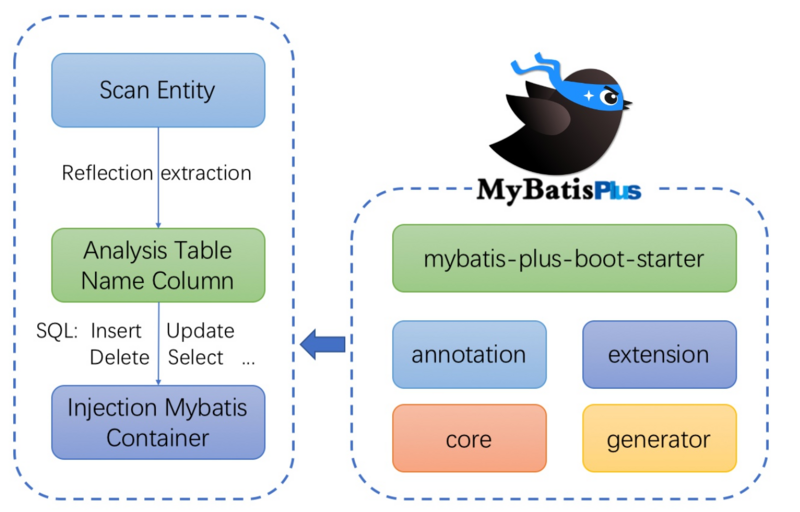
快速开始[SpringBoot工程]
1.添加依赖[最新版本]
<dependency>
 <groupId>com.baomidou</groupId>
 <artifactId>mybatis-plus-boot-starter</artifactId>
 <version>3.3.1.tmp</version>
</dependency>
2.引入数据库的配置[Mysql]
spring:
  datasource:
    type: com.alibaba.druid.pool.DruidDataSource
    druid:
      driver-class-name: com.mysql.cj.jdbc.Driver
      url: jdbc:mysql://rm-bp12i2og5710db9v75o.mysql.rds.aliyuncs.com:3306/cg_engine_test?useUnicode=true&characterEncoding=utf-8&autoReconnect=true&rewriteBatchedStatements=true&useSSL=false&serverTimezone=Asia/Shanghai
      username: account01
      password: Hzga@1234
3.引入mybatis-plus特性配置
# mybatis-plus相关配置
mybatis-plus:
  # xml扫描,多个目录用逗号或者分号分隔(告诉 Mapper 所对应的 XML 文件位置)
  mapper-locations: classpath:mybatis/*.xml
  # 以下配置均有默认值,可以不设置
  global-config:
    db-config:
      #主键类型 AUTO:"数据库ID自增" INPUT:"用户输入ID",ID_WORKER:"全局唯一ID (数字类型唯一ID)", UUID:"全局唯一ID UUID";
      id-type: auto
      #字段策略 IGNORED:"忽略判断"  NOT_NULL:"非 NULL 判断")  NOT_EMPTY:"非空判断"
      field-strategy: NOT_EMPTY
      #数据库类型
      db-type: MYSQL
      #逻辑删除标识
      logic-delete-value: 0
      #非逻辑删除
      logic-not-delete-value: 1
  configuration:
    # 是否开启自动驼峰命名规则映射:从数据库列名到Java属性驼峰命名的类似映射
    map-underscore-to-camel-case: true
    # 如果查询结果中包含空值的列,则 MyBatis 在映射的时候,不会映射这个字段
    call-setters-on-nulls: true
    # 这个配置会将执行的sql打印出来,在开发或测试的时候可以用
    log-impl: org.apache.ibatis.logging.stdout.StdOutImpl
  #设置别名
  type-aliases-package: com.aliyun.mybatis.dao
4.在 Spring Boot 启动类中添加 @MapperScan 注解,扫描 Mapper 文件夹
@SpringBootApplication
@MapperScan(basePackages = {"com.aliyun.mybatis.dao"})
public class DemoApplication {

    public static void main(String[] args) {
        SpringApplication.run(DemoApplication.class, args);
    }

}
5.编写对应的关系实体[ 常见的注解 ]
@Data
@AllArgsConstructor
@ToString
@EqualsAndHashCode
//指定对应的映射表
@TableName("user_info")
public class UserInfo {
    //指定主键类型
    @TableId(type = IdType.AUTO)
    private Long id;

    private String userId;

    private Long tbUserId;

    private String userName;

    private String userMobile;

    private String address;

    private Date gmtCreate;

    private Date gmtModified;

    private Double totalCharityHours;

    private Integer userRank;

    private String avatar;
}
6.编写mapper
@Mapper
@Repository
public interface UserInfoDao extends BaseMapper<UserInfo> {
}
7.编写测试类运行
@RunWith(SpringJUnit4ClassRunner.class)
@SpringBootTest(classes = DemoApplication.class)
class DemoApplicationTests {

    @Autowired
    private UserInfoDao userInfoDao;

    @Test
    public void test() {
        UserInfo userInfo = userInfoDao.selectById(11);
        System.out.println();
    }
}
8.Chain 调用方式:
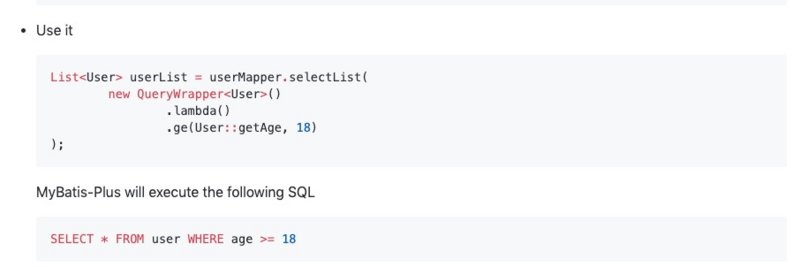
实践样例:
样例1.@TableFiedl(fill = FiedlFill.填充策略)
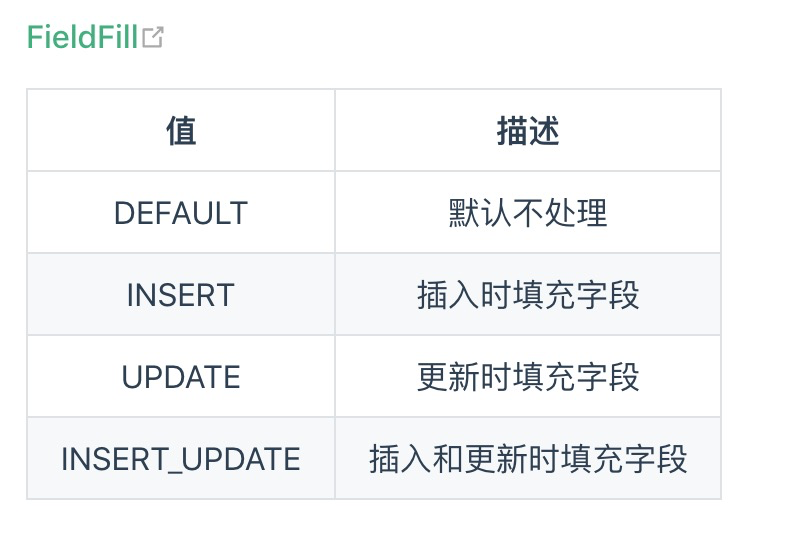
1.1.在使用的字段上加上注解
@TableField(fill = FieldFill.INSERT) // 创建时间只在添加是填充
private Date gmtCreate;

@TableField(fill = FieldFill.INSERT_UPDATE) // 更新时间在添加和更新时都填充
private Date gmtModified;
1.2.自定义类实现MetaObjectHandler类即可,重写填充策略的两个方法用于insert和update,关键的是setFieldValByName()方法,第一个参数是实体的属性,第二个参数是 设置的默认值 。
@Component
public class MetaObjectHandlerConfig implements MetaObjectHandler {

    @Override
    public void insertFill(MetaObject metaObject) {
        setFieldValByName("gmtCreate", new Date(), metaObject);
        setFieldValByName("gmtModified", new Date(), metaObject);
    }

    @Override
    public void updateFill(MetaObject metaObject) {
        this.setFieldValByName("gmtModified",new Date(), metaObject);
    }
}
实例2: mybatis-plus配合分页插件实现多租户场景
Mybatis-plus配置文件[ 配置项相关 ]
这里主要介绍的是springboot的.yml配置文件的方式,这部分的配置主体结构大概如下:
mybatis-plus:
  ......
  configuration:
    ......
  global-config:
    ......
    db-config:
      ......
那我们也把分为4个部分来介绍
A:其中常用的配置有mapper-locations、type-aliases-package
mybatis-plus:
  # Mybatis的核心配置文件位置
  config-location: classpath:mybatis-config.xml
  # 指定外部化 MyBatis Properties 配置,通过该配置可以抽离配置,实现不同环境的配置部署
  configuration-properties: classpath:mybatis-config.properties
  # Mapper对应的xml文件扫描,多个目录用逗号或者分号分隔
  mapper-locations: classpath*:/mapper/**/*Mapper.xml
  # MyBaits 别名包扫描路径,通过该属性可以给包中的类注册别名,注册后在 Mapper 对应的 XML 文件中可以直接使用类名,而不用使用全限定的类名(即 XML 中调用的时候不用包含包名)
  type-aliases-package: com.ck.**
  # 该配置请和 typeAliasesPackage 一起使用,如果配置了该属性,则仅仅会扫描路径下以该类作为父类的域对象
  type-aliases-super-type: java.lang.Object
  # 枚举类 扫描路径,如果配置了该属性,会将路径下的枚举类进行注入,让实体类字段能够简单快捷的使用枚举属性
  type-enums-package: com.baomidou.mybatisplus.samples.quickstart.enums
  # 启动时是否检查 MyBatis XML 文件的存在,默认不检查
  check-config-location: true
  # SIMPLE:该执行器类型不做特殊的事情,为每个语句的执行创建一个新的预处理语句,REUSE:该执行器类型会复用预处理语句,BATCH:该执行器类型会批量执行所有的更新语句
  default-executor-type: REUSE
B:常用的配置有map-underscore-to-camel-case、cache-enabled、jdbc-type-for-null、log-impl,
configuration:
    # 配置返回数据库(column下划线命名&&返回java实体是驼峰命名),自动匹配无需as(没开启这个,SQL需要写as: select user_id as userId)
    map-underscore-to-camel-case: true
    # 全局地开启或关闭配置文件中的所有映射器已经配置的任何缓存,默认为 true
    cache-enabled: false
    # 懒加载
    aggressive-lazy-loading: true
    # NONE:不启用自动映射 PARTIAL:只对非嵌套的 resultMap 进行自动映射 FULL:对所有的 resultMap 都进行自动映射
    auto-mapping-behavior: partial
    # NONE:不做任何处理 (默认值)WARNING:以日志的形式打印相关警告信息 FAILING:当作映射失败处理,并抛出异常和详细信息
    auto-mapping-unknown-column-behavior: none
    # 如果查询结果中包含空值的列,则 MyBatis 在映射的时候,不会映射这个字段
    call-setters-on-nulls: true
    # 配置JdbcTypeForNull, oracle数据库必须配置
    jdbc-type-for-null: "null"
    # 这个配置会将执行的sql打印出来,在开发或测试的时候可以用
    log-impl: org.apache.ibatis.logging.stdout.StdOutImpl
C:常配置db-config
global-config:
    # 是否控制台 print mybatis-plus 的 LOGO
    banner: true
    # 机器 ID 部分(影响雪花ID)
#    worker-id:
    # 数据标识 ID 部分(影响雪花ID)(workerId 和 datacenterId 一起配置才能重新初始化 Sequence)
#    datacenter-id:
D:常用db-type
db-config:
      #表名下划线命名默认true
      table-underline: true
      #id类型
      id-type: auto
      #是否开启大写命名,默认不开启
      #capital-mode: false
      #逻辑已删除值,(逻辑删除下有效) 需要注入逻辑策略LogicSqlInjector 以@Bean方式注入
      logic-not-delete-value: 0
      #逻辑未删除值,(逻辑删除下有效)
      logic-delete-value: 1
      #数据库类型 这个属性没什么用 数据库类型,默认值为未知的数据库类型 如果值为OTHER,启动时会根据数据库连接 url 获取数据库类型;如果不是OTHER则不会自动获取数据库类型
      db-type: mysql
      # IGNORED    忽略判断 NOT_NULL 非NULL判断  NOT_EMPTY 非空判断(只对字符串类型字段,其他类型字段依然为非NULL判断)  DEFAULT    追随全局配置 类似的还有update-strategy、select-strategy等
      insert-strategy: not_null
复杂的条件构造器
a.使用自定义wrapper实现sql查询
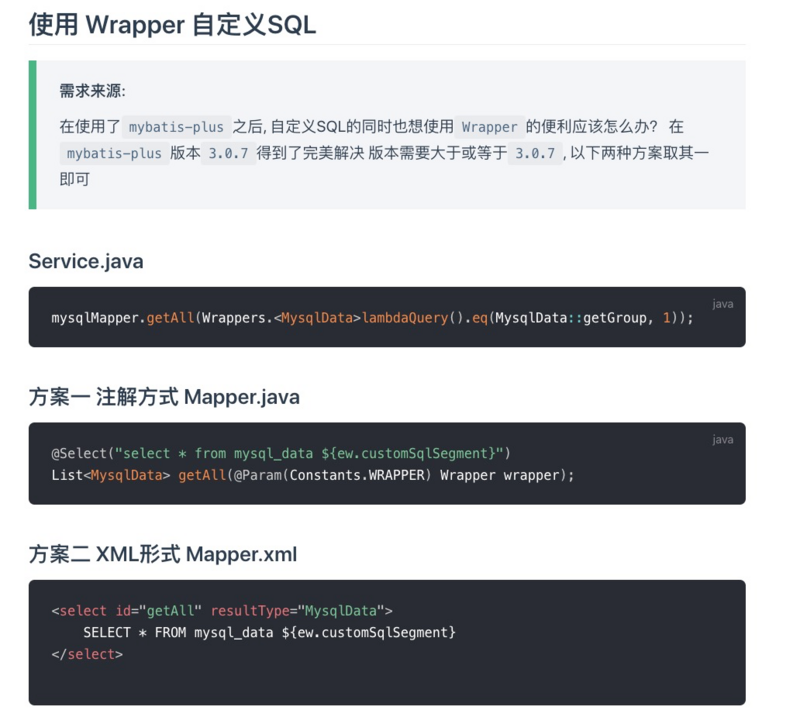
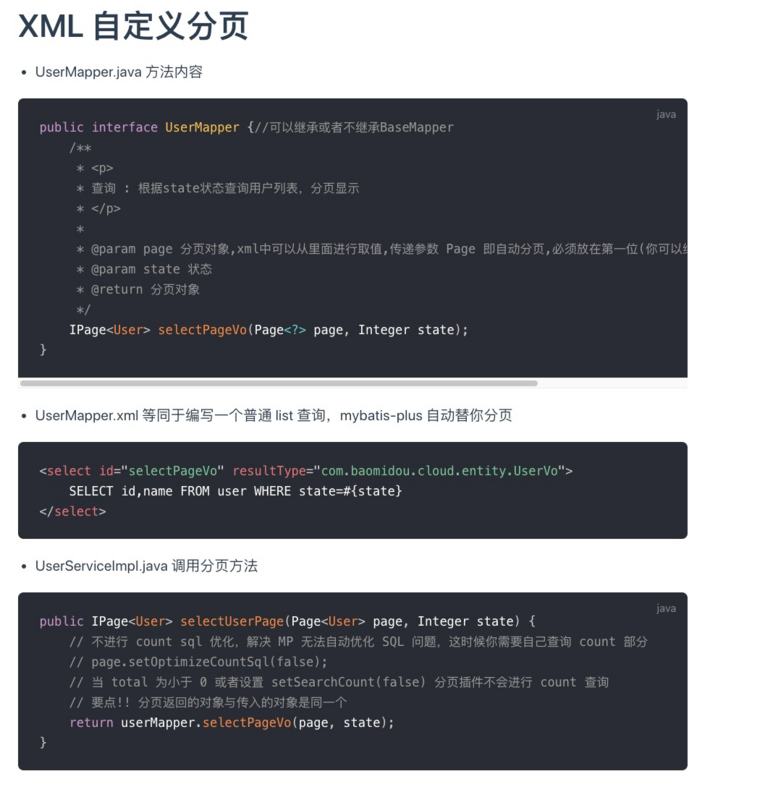
b.自定义实现分页查询功能(IPage已封装)
常用的Idea插件
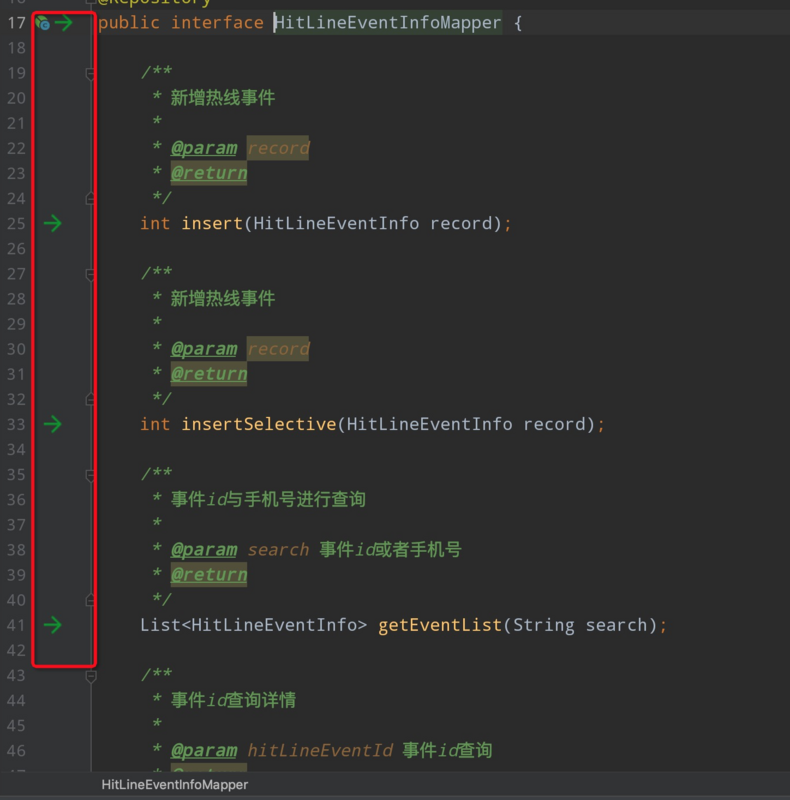
1.Free Mybatis plugin:快速引导与定位
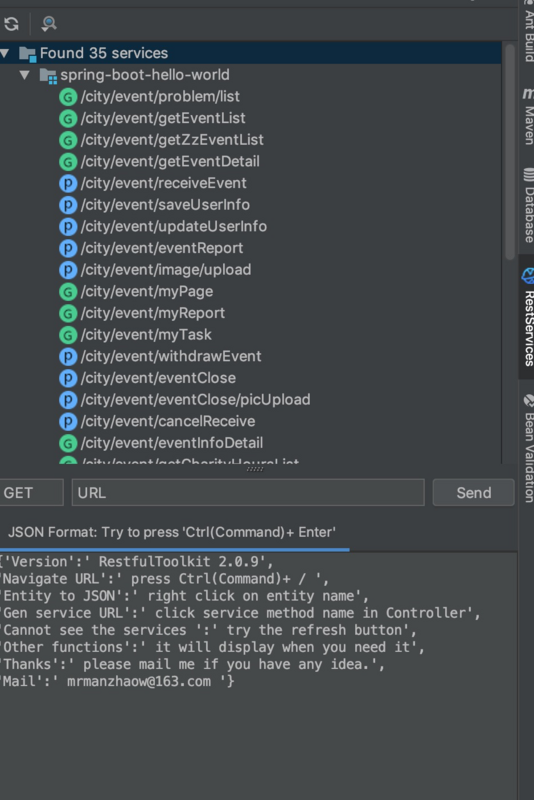
2.RestfulToolkit 服务开发辅助工具集(类似于Postman)
正文到此结束
- 本文标签: bean API XML Spring Boot ssl dataSource junit https ACE UI CTO cache spring REST equals db2 src 数据库 Service RESTful 实例 id rewrite 开发 lambda struct Word 配置 时间 自动生成 目录 插件 bus tab lib 部署 Oracle 代码生成器 IDE Select iBATIS apache 参数 缓存 ip 删除 map plugin logo 需求 list springboot classpath autoReconnect=true GMT tar Logging 数据 App IO update 分页 Statement maven http sql mapper mysql 代码 value 分布式 测试 autoReconnect druid SQLite 开发者 智能 executor java mybatis JDBC db core cat
- 版权声明: 本文为互联网转载文章,出处已在文章中说明(部分除外)。如果侵权,请联系本站长删除,谢谢。
- 本文海报: 生成海报一 生成海报二
热门推荐









相关文章

近期评论
-
出现OpenClaw "device signature expired"。the Gateway rejects if Math.abs(Date.now() - signedAt) > 10 * 60 * 1000 (10 minutes)
-
-
想购买您这个站,我的联系方式QQ741756694微信同步 能卖联系
-
-
-
博主的博客用的什么技术栈,内容都是干货,赞
-
-
https://www.liuhaihua.cn/archives/40657.html 这篇博客中的图片打不开了
-
不会英语啊。
-
Loading...
![[HBLOG]公众号](https://www.liuhaihua.cn/img/qrcode_gzh.jpg)

